On this page
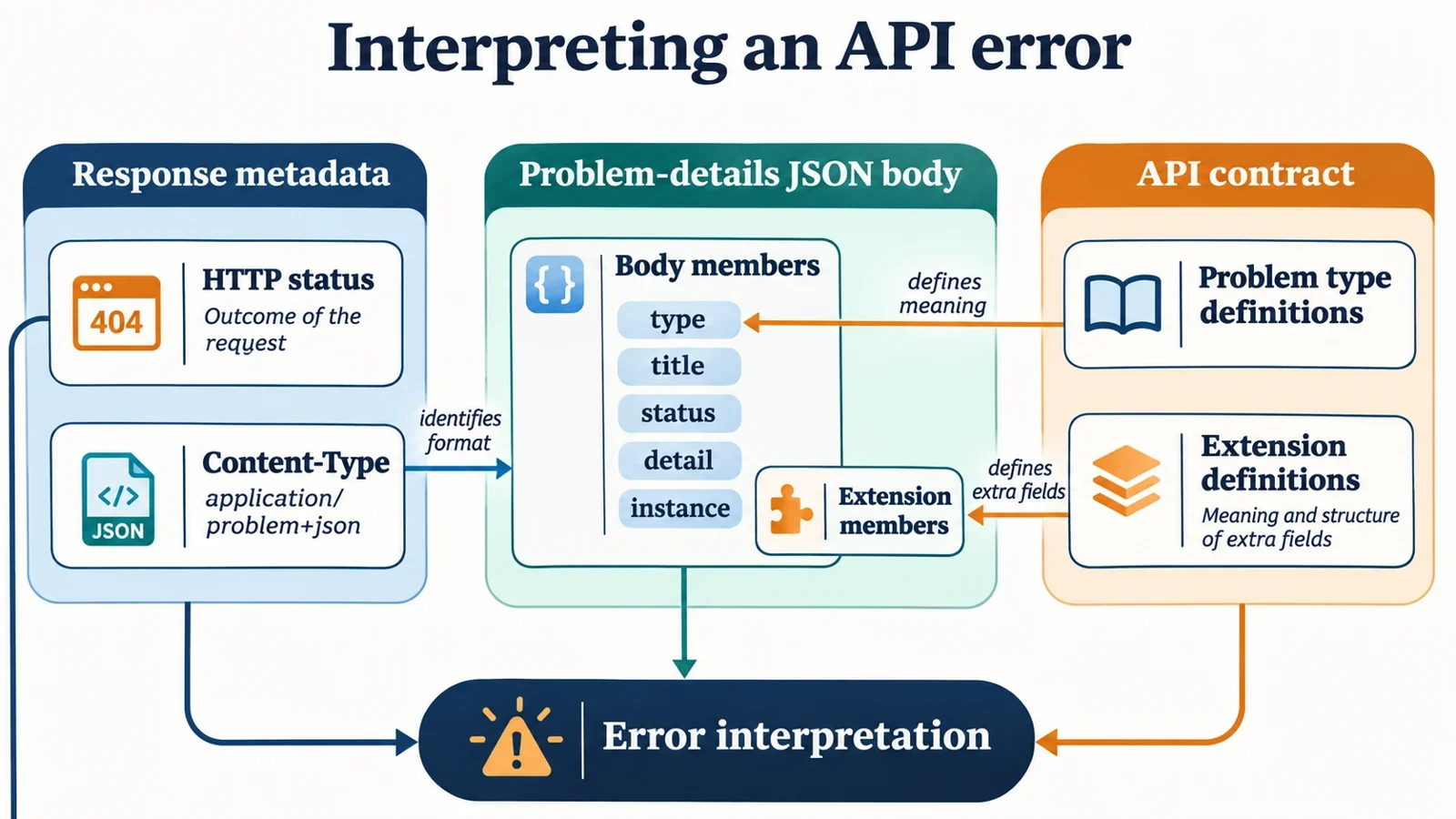
To interpret an application/problem+json error, capture the actual HTTP status and Content-Type alongside the body. Then identify the problem type, read the explanation of this occurrence, and check how the API defines any extension fields. Formatting the JSON helps expose its structure, but understanding the response also requires its HTTP context and the API contract.
This guide follows an explicitly invented validation response. It shows how type, title, status, detail, and instance contribute different information, how to investigate a status mismatch, and what to include in a troubleshooting report. The example supplies a concrete inspection exercise without assuming that every API uses the same validation structure.
Capture the HTTP response and its body
A problem-details document uses a JSON object. Its JSON serialization is identified by the media type application/problem+json. Start by recording both the response metadata and the body, because they answer different questions.
The actual HTTP status tells you which status accompanied the response. The Content-Type records how the response identifies its content. The JSON body contains the problem information you can inspect. A pasted object alone cannot establish what status or Content-Type arrived with it.
| Evidence to capture | What it lets you check |
|---|---|
| Actual HTTP status | Whether the body reports the same status |
| Content-Type | Whether the response identifies its body as application/problem+json |
| Original response body | Which members and values were received |
| Triggering request context | Which request produced the captured response |
Keep the original body available when creating a formatted copy. That gives you a reference if a later report contains only selected fields or edited values.
Before interpreting anything, establish whether the metadata and body belong to the same response. When several attempts are involved, label each captured response clearly. Otherwise, a body from one attempt and a status from another can produce a misleading comparison.
If metadata was not retained, record that gap explicitly. Do not reconstruct the received HTTP status from the body’s status value.
Walk through an illustrative validation error
The following response is entirely invented for this walkthrough. Its address and occurrence reference do not establish a real service or documentation endpoint.
Illustrative response metadata:
HTTP status: 422
Content-Type: application/problem+json
Illustrative response body:
{
  "type": "https://example.test/problems/validation",
  "title": "Invalid input",
  "status": 422,
  "detail": "age must be an integer.",
  "instance": "/problems/demo-1",
  "errors": [
    {
      "pointer": "#/age"
    }
  ]
}
Read the example in layers. The metadata records HTTP status 422 and the problem-details media type. Inside the body, type identifies the fictional validation problem, title supplies the short summary, and status reports 422. The detail explains the failed constraint: the age value must be an integer. The instance refers to this particular occurrence.
For this invented API contract, errors is an extension containing an array of validation-error details. Each illustrated pointer uses JSON Pointer to locate a problem in the request content. Here, #/age identifies the request’s age field.
That explanation does not establish every rule for the field. The example supplies an integer constraint, but no accepted range, optionality rule, or conversion behavior. Check the real API contract before deciding which replacement value to send. Likewise, do not assume another API returns an errors array merely because this illustration does.
Use type to identify the problem
The type member is a string containing a URI reference that identifies the problem type. The resolved type URI is the primary identifier to retain when determining which problem the response describes.
In the invented response, record https://example.test/problems/validation as the supplied type. Keep that identifier alongside the human-readable explanation so a report preserves both the problem category and the details of this occurrence.
If type is absent, the assumed value is about:blank. Do not invent a type URI from the title or from your interpretation of the error. The problem-details rules also specify treating a member with an incorrect value type as absent. For example, a numeric type would not satisfy the stated requirement that this member contain a string.
Resolve references before comparing identifiers
A relative type reference is resolved against the document’s base URI. Preserve enough response context to establish that base before comparing resolved identifiers. If the base is unknown, record the unresolved reference and the missing context instead of choosing a convenient website address.
Identification and documentation retrieval are separate tasks. For a locator type URI, human-readable problem documentation is recommended when it is dereferenced. However, automatic dereferencing is discouraged except when providing information to developers. Interpreting the identifier does not establish that a documentation page was retrieved or that the fictional address is available.
Separate title, detail, and instance
The invented response contains three values that are easy to collapse into a single error message. Keeping their roles separate makes a report more useful.
| Member | Value in the illustration | How to read it here |
|---|---|---|
title |
Invalid input |
A short summary of the problem |
detail |
age must be an integer. |
The explanation of the failed age constraint |
instance |
/problems/demo-1 |
A reference identifying this occurrence |
The title gives a reader a quick orientation. The detail supplies the information needed to investigate the illustrated input failure. Quoting only Invalid input would discard the clue about age; quoting only the detail would discard the occurrence reference that might help with correlation.
Retain instance exactly as received when preparing a report. If the API’s documented support workflow uses occurrence references, that value can help connect the report to the same occurrence.
Its presence does not establish that it is a request ID, a retrievable log URL, or a location the reader can open. Ask how the API uses the reference and whether retrieval is documented before building a workflow around it.
These readings explain the supplied illustration. Before implementing reusable client behavior, confirm the complete member definitions and requirements in the applicable specification and API documentation.
Compare status with the actual HTTP status
In the first illustration, the body reports "status": 422, and the captured HTTP status is also 422. Record that agreement as an observation about this response.
Now create a second invented case: keep the earlier response body unchanged except for replacing its status value with 400, while the actual HTTP response still reports 422.
| Illustrative case | Actual HTTP status | Body’s status |
Observation |
|---|---|---|---|
| Original validation response | 422 | 422 | The values agree |
| Modified response | 422 | 400 | The values disagree |
The second case exposes a mismatch. It does not, by itself, explain where the mismatch arose or establish how a client must handle it.
Start the investigation with the captured response. Confirm that the body and metadata came from the same attempt, and check whether the body was edited when copied into a report. If captures exist at different points in the request’s path, identify which point each capture represents before comparing them.
Next, verify the formal definition of status, the applicable handling rules, and the API’s documented behavior. The evidence here supports reporting both values; it does not supply a rule for choosing one as the basis of application behavior.
Do not silently change either value to make the record consistent. Preserve the disagreement so the person investigating can assess the original evidence.
Interpret extensions through the API contract
Separate the problem-details members discussed here—type, title, status, detail, and instance—from the invented API’s errors extension. Recognizing the media type does not explain every additional member in the body.
For this example, the extension contract supplies two essential meanings:
errorscontains an array of validation-error details.- Within an array entry,
pointeruses JSON Pointer to locate a problem in the request content.
The nested pointer is part of that extension. Its presence does not make it another standard top-level problem-details member. In the illustrated entry, its value, #/age, directs attention to the age field in the triggering request.
Verify the extension before acting on it
For a real response, find the API’s explanation of the extension and compare it with the actual body. Useful questions include whether each entry contains a pointer, how the API describes entries without one, and which other members supply information needed to understand a validation failure. These are questions to verify, not behaviors established by the example.
When reporting a problem, identify the relevant location clearly, such as the pointer member in the first errors entry, and retain its received value. Then connect it to the corresponding request value only as the documented extension permits.
If the API contract is unavailable, you can still describe the array and its contents. Leave their unconfirmed meanings explicit.
Inspect the example JSON and state expected observations
Use a JSON formatter to inspect the body from the validation walkthrough. Paste only the JSON object into the formatter; keep the HTTP status and Content-Type in your separate response record.
- Format the supplied body.
- Compare the resulting structure with the observations below.
- Check the values against the original body.
- Compare the body’s
statuswith the separately recorded HTTP status.
| Location | Expected observation in this example |
|---|---|
| Entire body | One JSON object |
type |
String containing the illustrated type reference |
title |
String containing Invalid input |
status |
Number with value 422 |
detail |
String containing the age constraint explanation |
instance |
String containing /problems/demo-1 |
errors |
Array containing one illustrated object |
First error entry’s pointer |
String containing #/age |
These are expected observations for this exercise, rather than a complete statement of every member’s formal requirements.
Separate parsing from interpretation
Successful parsing establishes that the input was accepted as JSON. It cannot establish which HTTP status accompanied the body, what Content-Type was received, or how the API defines an extension.
Repeat the inspection with the second invented case, where the body contains "status": 400. Formatting can expose the number 400, but the separate response record is what reveals its disagreement with HTTP status 422. A neatly formatted body still needs context before it can support a troubleshooting conclusion.
Collect evidence for a useful troubleshooting report
A useful report connects the observed response to the request that triggered it. Include enough context for another developer to understand the failure while preserving the distinction between received values and your interpretation.
Collect the following evidence:
- The observed HTTP status and Content-Type.
- The response body, including the body’s
statusif present. - The supplied problem type and its resolved identifier when a relative reference requires resolution.
- The occurrence reference from
instance, when available. - The relevant detail text.
- The documented extension locations and values involved, such as the first error entry’s
pointer. - The triggering request method, target, relevant input, and steps needed to reproduce the failure.
- Any correlation identifier whose role is documented by the API.
For the original invented response, the central observations are straightforward: HTTP status 422, Content-Type application/problem+json, body status 422, the illustrated validation type, occurrence /problems/demo-1, and a detail and pointer concerning age. For the modified response, explicitly add that the body reports 400 while HTTP reports 422.
Mark missing information with precise statements such as “HTTP status not captured,” “base URI not established,” or “extension meaning not documented.” These gaps tell the next investigator what evidence to obtain.
Before recommending a client change, resolve the outstanding contract questions: the applicable member definitions, formal status-handling rules, extension semantics, and any documented use of occurrence or correlation identifiers. That keeps the proposed fix tied to evidence rather than assumptions drawn from a readable JSON object.