On this page
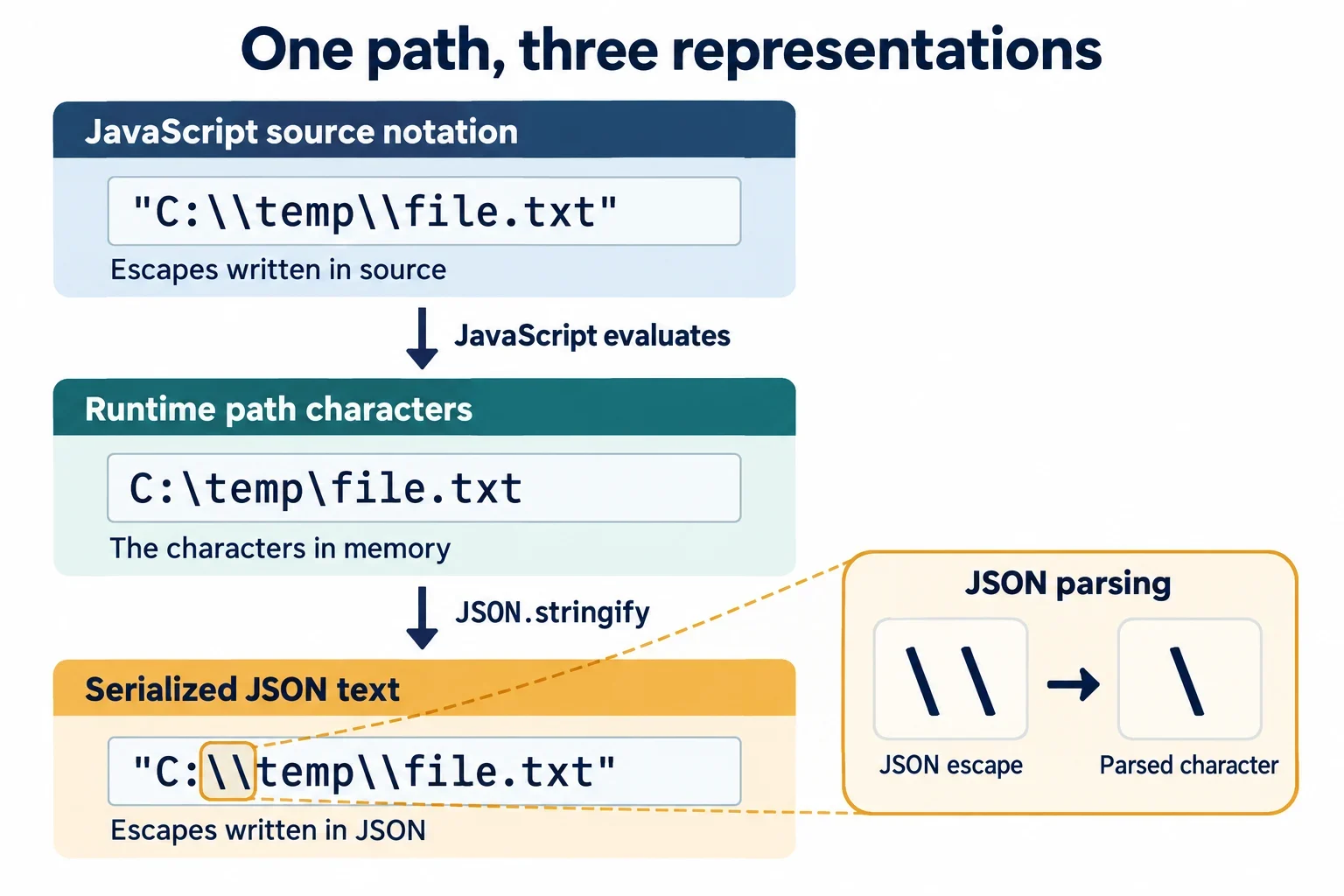
Windows paths need doubled backslashes when their separators are written inside a JSON string because the JSON escape \\ represents one literal backslash. The path value C:\work\report.txt therefore appears in JSON text as {"path":"C:\\work\\report.txt"}. Parsing that document recovers the original path characters.
The practical challenge is identifying which representation you are inspecting. The intended path, the JSON document carrying it, and any programming-language source used to create it are separate checkpoints. Start by labeling those checkpoints. Then check both JSON syntax and the characters the consuming application receives: a document can parse successfully while carrying a different value from the one you intended.
The path value and its JSON representation
Start with the actual path value:
C:\work\report.txt
Its backslashes separate Windows path components. Now compare the JSON document that carries that value:
{"path":"C:\\work\\report.txt"}
Inside the JSON string, each pair of backslashes represents one literal backslash. After parsing, the value associated with path should match the first example. The doubled spelling belongs to the serialized representation.
| Checkpoint | What you are inspecting | Expected relationship |
|---|---|---|
| Intended path value | The characters the application should receive | Keep this as the reference value. |
| Serialized JSON text | The document containing the encoded path | Each original backslash has a doubled spelling. |
| Parsed path value | The characters recovered from the document | These should match the intended value exactly. |
This gives you a concrete way to review a proposed fix. For this example, ask whether parsing returns C:\work\report.txt, including both separators. A difference in the visible number of backslashes between the path and its JSON representation is expected.
Before editing a field, establish whether it accepts a path value or a complete JSON document. Use the first representation for a path value and the second for a document containing that value. Copying the spelling from the wrong checkpoint can change what you submit.
The useful question is: Am I inspecting the intended characters, or text that encodes those characters? Resolve that before deciding that a backslash is missing or excessive.
An unescaped path can fail or silently change
An unescaped separator can produce an obvious syntax failure. Consider this invalid JSON text:
{"path":"C:\work"}
Here, the backslash begins \w, which strict JSON does not recognize as an escape. For the intended path value C:\work, the serialized document should contain:
{"path":"C:\\work"}
A less obvious problem occurs when the characters after a backslash form a recognized escape. Consider a document intended to carry the path C:\new\tools, but written this way:
{"path":"C:\new\tools"}
Successful parsing cannot establish that the intended path survived. In particular, \n represents a newline rather than a literal backslash followed by n. That change alone means the parsed value differs from the intended path. You do not need to identify the other escape’s meaning to establish this mismatch.
The JSON representation that preserves the intended value is:
{"path":"C:\\new\\tools"}
What should you inspect after parsing?
Compare the recovered characters with the original value, paying attention to each intended separator and the character immediately after it. If another escape needs investigation, check the parser’s documented rules and inspect its result rather than guessing from the path’s appearance.
Treat syntax acceptance and character preservation as separate checks. A rejection identifies a problem in the document’s syntax. Acceptance still leaves the question of whether the parsed string matches your intended input. This distinction helps explain why fixing an error message is only part of repairing a path.
Let a serializer handle the backslashes
When you already have the intended path value, pass that value to a serializer. Serializers escape backslashes according to the actual string they receive, so preparing a manually escaped version first is unnecessary.
Use the following language-neutral example as a round-trip check in your chosen environment. Begin with this original value:
C:\work\report.txt
Supply it as the value of path when creating the JSON document. The expected representation is:
{"path":"C:\\work\\report.txt"}
After parsing that document, inspect the recovered path value. It should be:
C:\work\report.txt
The expected comparison result is that the recovered value equals the original value, character for character. These examples specify the input and expected representations; implement the comparison using your environment’s documented serialization and parsing interfaces.
Check the value entering the serializer
The serializer can preserve the value you supply. If that value was already changed while preparing it for JSON, compare it with the original intended path before continuing. Otherwise, you may be investigating the output of a transformation that happened earlier.
A useful sequence is to retain the original path, serialize an object containing that value, parse the resulting document, and compare the recovered field with the retained original. Keep the comparison when adapting the example to a real input.
This approach gives you a clearer test than manually adding backslashes until the output looks familiar. The question becomes whether the same characters survive the round trip. Once that check passes, you can investigate how the consuming application uses the recovered path.
Separate source-code escaping from JSON escaping
If a program creates your JSON, inspect three checkpoints: the source expression you wrote, the runtime path value supplied to the serializer, and the serialized JSON document. Keep these checkpoints separate when diagnosing a mismatch.
| Checkpoint | Question to answer |
|---|---|
| Programming-language source | What value does this expression create under the language’s documented rules? |
| Runtime path value | Does the serializer receive the intended path characters? |
| JSON text | Does the document encode those characters correctly? |
The JSON examples in this guide show JSON text and path values. They do not specify how to write a string literal in every programming language. Before placing an example inside source code, check that language’s documentation for the literal form you intend to use. Inspect the resulting value before passing it to the serializer.
Establish what a display represents
If a debugger or logger presents strings using escaped notation, establish that convention before counting its visible backslashes. Ask whether the display shows the underlying path characters or a representation of them. Check the display tool’s documentation when the answer is unclear.
Also trace the input to each serialization step. Are you supplying the original path value, or a string that already contains serialized JSON? Those are different inputs and should be labeled separately during debugging.
Keep a small record of what enters and leaves each step. If one serialized result becomes the input to another step, record that transition explicitly. Then compare the recovered path with the original at the appropriate checkpoint. This makes it easier to locate where the value changed without guessing a new backslash count from the final display.
Apply the same reasoning to UNC paths
The UNC example begins with two backslashes before the server name. Its actual path value is:
\\server\share\report.txt
Preserve both leading backslashes as well as every later separator. When this value is carried in JSON, its representation is:
{"path":"\\\\server\\share\\report.txt"}
The JSON text contains four backslashes before server. Each pair represents one literal backslash, recovering the two leading backslashes in the original value. Each later pair likewise recovers one separator.
After parsing, the path value should be:
\\server\share\report.txt
| Part being checked | Original value | JSON representation |
|---|---|---|
| Before the server name | Two backslashes | Four backslashes |
| Each later separator | One backslash | Two backslashes |
Use the same round-trip procedure as for the earlier path: retain the original value, supply it to a serializer, parse the document, and compare the recovered field with the original. Include the leading characters in that comparison.
When sharing a bug report, label these representations. A statement that a path contains four backslashes is ambiguous unless it identifies whether those characters appear in JSON text, a parsed value, or an escaped display.
After confirming character preservation, verify the intended server, share, and path requirements with the consuming application. The representation check answers whether the supplied characters survived; the application’s requirements remain a separate checkpoint.
Check syntax, parsed characters, and path interpretation
Use a sequence that distinguishes invalid JSON syntax, unintended characters in an accepted string, and interpretation of the recovered path by the consuming application.
Start by placing the serialized document in the documented JSON inspection interface and checking its syntax. If the document is rejected, inspect the escape at the reported problem location. Prefer regenerating the document from the original path value when a serializer is available.
| Check | Question to answer | Next action |
|---|---|---|
| JSON syntax | Does a backslash start an invalid escape? | Correct the serialized representation and validate it again. |
| Parsed characters | Does the recovered string match the intended path? | Compare every character, including separators and leading backslashes. |
| Path interpretation | Does the application use that recovered value as intended? | Verify the application’s path requirements and relevant directory context. |
After repairing the JSON, inspect the consuming application’s parsed value. A separate round-trip example can help isolate the issue, but also check the actual value where the application receives or uses it.
Avoid repairs that hide the mismatch
Deleting backslashes can make edited JSON parse while changing the path’s meaning. Repeatedly adding escapes without identifying the representation can also obscure where the mismatch began. Preserve the intended value and use it as the reference for each comparison.
If the recovered characters match, ask what path form the application expects and which directory context applies. Verify those requirements instead of treating successful parsing as proof that the application will interpret the path as intended.
For a useful problem report, include the intended path value, the serialized document, and the parsed value, each clearly labeled. Add the result of comparing the original and recovered strings. These checkpoints let someone review the mismatch without relying on an unexplained count of visible backslashes.