On this page
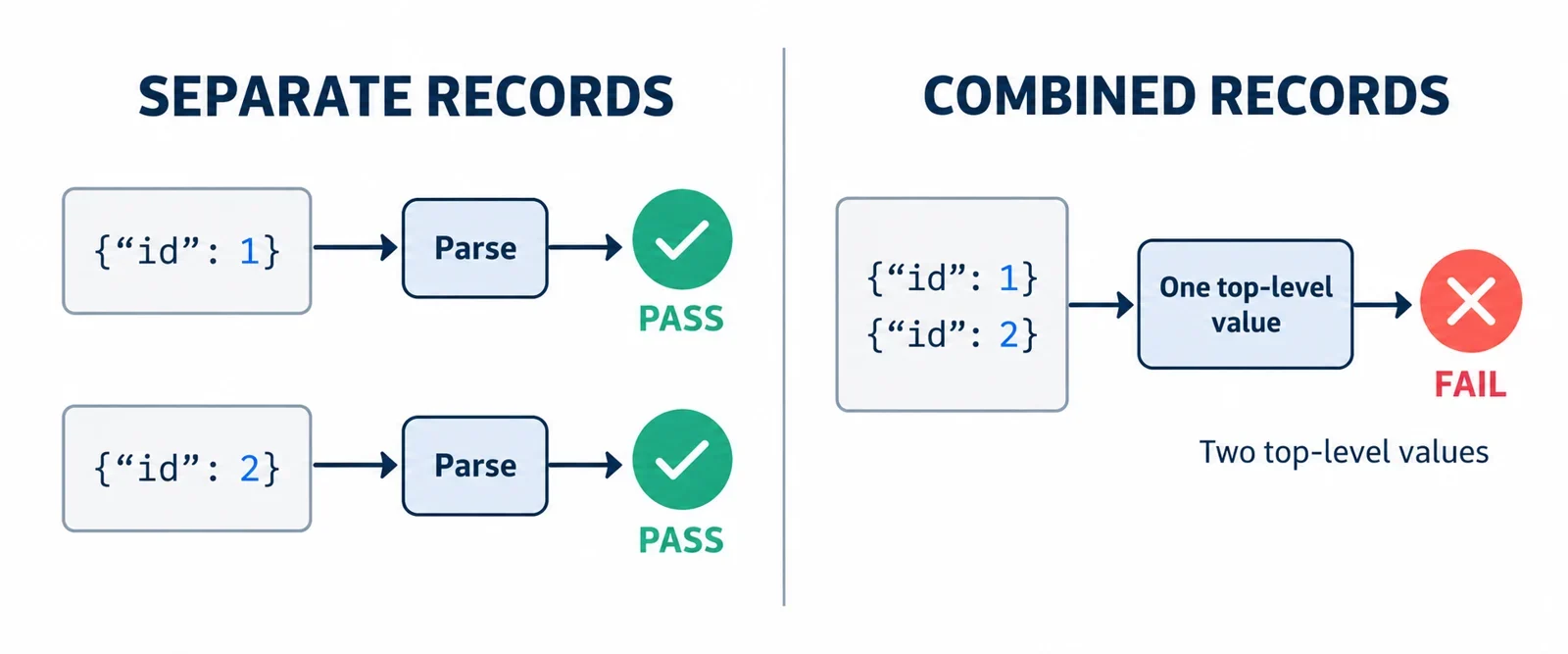
NDJSON logs can fail in a JSON formatter even when every individual record is valid. The mismatch is often how the input separates records: NDJSON and JSONL use newlines between independent JSON values, while a JSON document contains one top-level value. Pasting several records into a formatter that expects one document can therefore produce an error after the first record.
Start by testing individual records and checking their boundaries. If the receiving interface requires one document, combine validated records into a JSON array. The examples below show both approaches, including expected results, while keeping malformed records, empty lines, duplicate-key handling, and number preservation as separate questions.
Why valid records fail when pasted together
A formatter’s rejection of a whole log does not establish that its individual records are malformed. First check whether the formatter expects a single JSON document.
Consider these two JavaScript expressions:
JSON.parse('{"id":1}');
// Expected: an object whose id property is 1
JSON.parse('{"id":1}\n{"id":2}');
// Expected: throws a SyntaxError
The second input contains two independent top-level values. Its newline separates the records, but does not turn them into one JSON document. A conventional formatter can accept the first value and then reject the additional input. The exact error wording depends on the parser, so diagnose the input structure rather than relying on a particular message.
Test {"id":2} independently as well. If both records parse alone, you have evidence of a framing mismatch: each record is acceptable separately, but their combination is unsuitable for an interface expecting one document.
This distinction determines the next action. A malformed record needs correction or investigation at its original location. Valid independent records need an appropriate inspection workflow or a conversion into one enclosing value. Reformatting the same combined text without changing that structure does not resolve the mismatch.
Check record boundaries before splitting lines
Before using a line-based example, establish that every physical line contains one complete JSON value. A log showing indented events across several lines needs a different boundary check: splitting each line would separate parts of an event instead of separating complete records.
Compare these layouts:
{"id":1}
{"id":2}
{
  "id": 1
}
{
  "id": 2
}
The first layout provides one complete value per physical line. The second shows values spread across multiple lines. Applying the same split-and-parse operation to both layouts would not test the same thing.
An escaped newline is part of a value
There is another distinction inside string content:
{"message":"first\nsecond"}
{"id":2}
Here, the visible \n sequence inside the quoted message represents an escaped newline within that string. The physical line break after the first closing brace separates the records. Those two uses of a newline must not be confused when identifying boundaries.
Ask how the export was produced and whether it promises one complete value per line. Do not assume arbitrary multiline console output follows that arrangement. If indentation has spread events across lines, obtain a record-oriented export or establish the event boundaries before applying the examples below.
Validate each record and keep its line number
Once you have confirmed one complete record per line, validate records independently. Keep the original line position alongside each result so an error remains traceable to the input.
This JavaScript example deliberately includes a malformed second record:
const lines = ['{"id":1}', '{"id":}', '{"id":3}'];

lines.map((s, i) => {
  try {
    JSON.parse(s);
    return [i + 1, 'valid'];
  } catch {
    return [i + 1, 'invalid'];
  }
});
Expected result:
[[1,"valid"],[2,"invalid"],[3,"valid"]]
The failure on line 2 is caught within that record’s validation step, allowing line 3 to be checked. You can investigate the malformed record while retaining access to the valid records around it.
Preserve the location before filtering
Assign line numbers before removing or selecting lines. Otherwise, a reported position may describe a filtered list instead of the original input. That becomes especially confusing when empty lines appear before a malformed record.
For an error report, retain enough information to connect the result to its source: the original line number, whether parsing succeeded, and the associated record text when appropriate. Keep the untouched input available for comparison.
This example reports syntax acceptance only. It does not choose an empty-line policy, assemble an output document, or establish whether a later inspector preserves every detail of the original representation.
Combine validated records into one JSON array
When the receiving interface requires a single JSON document, an enclosing array can hold the independent records. Square brackets surround the collection, and commas separate adjacent elements.
For nonempty, single-line records containing small integers, this minimal JavaScript example demonstrates the conversion:
const text = '{"id":1}\n{"id":2}';

JSON.stringify(text.split('\n').map(s => JSON.parse(s)));
Expected return value, shown as a JavaScript string:
'[{"id":1},{"id":2}]'
The returned text has one top-level value: an array containing two objects. Each original record becomes one array element, in its original order. The brackets and commas provide the structure required to represent the collection as one document.
Understand the example’s limits
This conversion assumes that every split line is a complete, nonempty record. A malformed record causes its parse operation to throw, stopping this expression before it returns a completed conversion. Use independent validation first when you need a report covering all records.
An empty-line decision is also required before using this approach on input containing blank lines. Do not silently discard them as an incidental cleanup step.
Finally, this demonstration uses small integers. Its successful result illustrates record framing and array construction; it does not establish preservation of large numbers or their original numeric spelling. Those concerns require a separate check of the parser and serializer you intend to use.
Preserve values and make empty-line handling explicit
Do not assume every NDJSON record is an object. Records can also contain arrays or primitive values. A conversion intended to preserve records should keep each complete value as one element of the enclosing array.
For example:
const text = '42\n[1,2]';

JSON.stringify(text.split('\n').map(s => JSON.parse(s)));
Expected return value:
'[42,[1,2]]'
There are two original records and two elements in the resulting outer array. The first remains a number. The second remains an array nested inside the enclosing array. Turning the second record’s elements into separate outer elements would change the record structure.
If an ingestion service flattens array records, treat that as a separate ingestion policy. Verify its behavior before assuming its output is equivalent to this record-preserving conversion.
Decide what an empty line means
Empty lines need their own handling decision. Keep that decision distinct from the report of a nonempty record that fails to parse.
| Chosen handling | What the workflow should report |
|---|---|
| Reject empty lines | Identify their original line numbers and require resolution before conversion. |
| Skip empty lines | Record that they were skipped and retain original line numbers for remaining records. |
Also decide whether the policy covers whitespace-only lines. State that choice explicitly rather than leaving readers to infer it from a cleanup operation.
For input containing a valid record on line 1, an empty line on line 2, and another valid record on line 3, skipping the empty line should not rename the last record as source line 2. Output positions and original input positions serve different purposes.
Separate framing errors from inspector policies
After correcting record framing, inspect either one independent record or the constructed array in the JSON formatter. If an unexpected result remains, investigate it as a separate concern instead of repeatedly changing record separators.
Three useful checks address different questions:
| Concern | Question to investigate |
|---|---|
| Record framing | Does the interface expect one value, and did you supply several independent values? |
| Duplicate keys | What does the inspector document about accepting, reporting, or retaining repeated keys? |
| Number preservation | Does the processing path preserve the values and numeric spelling your task requires? |
A successful parse shows that the selected parser accepts that input. It does not establish every property of the resulting display or serialized output.
Check the behavior you depend on
For duplicate keys, consult the inspector’s stated handling and compare the original record with what it displays or returns. Do not infer that policy from a successful test using records without duplicate keys. If the policy is unspecified, ask for clarification before relying on the output.
Apply the same discipline to numbers. The small-integer examples here do not demonstrate how large numbers are handled. They also do not prove that parsing and stringifying retain an original number token’s spelling.
Keep the original text when those details matter, and verify the actual parser, inspector, and output path involved. Correct framing is necessary for an interface expecting one document, but it does not settle these separate preservation questions.
Choose record inspection or array conversion
Choose the workflow from the downstream interface’s requirements. If you are investigating a log stream, inspecting independent records can preserve useful context around a malformed line. If a consumer requires one document, construct an array after resolving validation failures and empty-line handling.
| Your immediate need | Suitable approach |
|---|---|
| Find a malformed record in a log | Validate records separately and report original line numbers. |
| Examine one event in a formatter | Supply that complete record by itself. |
| Supply a collection as one JSON document | Convert validated records into an enclosing array. |
| Investigate a large export | Prefer incremental validation and inspection where supported. |
Account for the size of the input
The short split-and-collect example holds the input and collected records in memory. It is useful for explaining the transformation, but should not be treated as a capacity guarantee for a large export or a particular formatter.
For larger inputs, check whether the available tools support incremental inspection and how they retain record locations. Confirm the receiving interface’s accepted structure before collecting everything into an array merely to inspect one failing event.
Before handing off converted output, verify that each retained source record corresponds to one array element, record order is preserved, and nested arrays remain nested. Confirm that any excluded empty lines were handled according to the stated policy and that no unresolved malformed record disappeared from the report.
These checks produce a concrete outcome: either independently inspectable records with traceable errors, or one array document suited to the receiving interface.