Contents
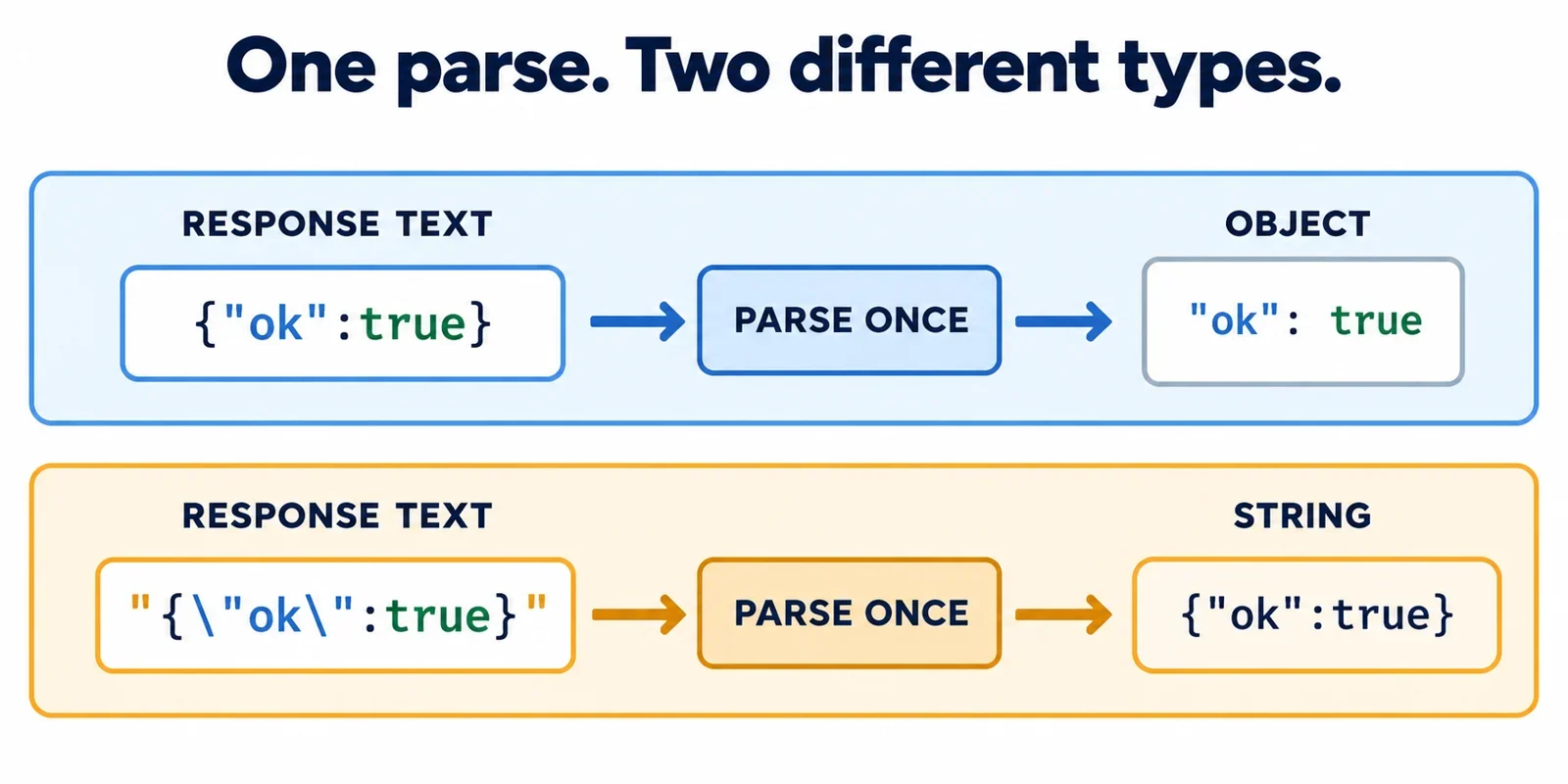
Inspect the value immediately after one parse. If that value is a string, parsing succeeded, but the result may differ from the object your application expects. A second parse is appropriate only when the documented response contract explicitly describes JSON text inside that string.
The key distinction is between the response body as text and the value obtained by parsing it. Two bodies can look similar in a log while producing different values. Likewise, a successful parser call does not establish that required properties exist.
Use the examples below to identify the actual value, reproduce an extra serialization layer, and locate the first mismatch between the response contract and your application’s expectations.
Compare two response bodies that produce different values
JSON is a text format for representing data. Start by comparing these two complete response bodies, keeping the surrounding quotes in the second example.
Body A:
{"ok":true}
Body B:
"{\"ok\":true}"
After one JSON parse, Body A produces an object. Body B produces a string whose contents are {"ok":true}. The braces inside that string do not turn it into an object.
| Response body | Result after one parse | What to inspect next |
|---|---|---|
| Body A | An object with an ok property |
Whether its properties satisfy the expected contract |
| Body B | A string containing JSON text | Whether the contract requires an encoded string |
The surrounding double quotes in Body B identify its outer JSON value as a string. JSON string literals require double quotes; the quotes around the embedded property name are escaped within that outer string. One parse removes the outer serialization layer and produces the string’s contents.
Do not diagnose the response from visible backslashes alone. A debugger or log display is not sufficient evidence that the response contains an extra encoding layer. Establish whether you are examining the original body, a parsed value, or a representation created for display.
For a useful comparison, record the complete response text and the type of the value obtained after one parse as separate observations. If you have only a copied log line, identify what operation produced it before concluding that the producer serialized the payload twice.
Inspect the value immediately after one parse
The instance method response.json() returns a promise that resolves to the result of parsing the response body as JSON. Inspect that result before applying another conversion:
const value = await response.json();

const kind = v =>
  v === null ? 'null' :
  Array.isArray(v) ? 'array' :
  typeof v;

console.log(kind(value));
console.log(value);
For JSON-parsed values, this classifier distinguishes an object from an array or null, while preserving the other results reported by typeof. Use it to answer a precise question: what value did this parsing operation produce?
Check the whole value before its fields
Suppose your application expects an object with a boolean ok property. Make that requirement explicit before using the property:
if (kind(value) !== 'object') {
  throw new Error('Expected a JSON object');
}

if (typeof value.ok !== 'boolean') {
  throw new Error('Expected a boolean ok property');
}
This is an illustrative shape check. Replace it with the requirements of your actual response contract. Distinguishing arrays and null first prevents an overly broad object check from being mistaken for validation of the expected payload.
Also identify the boundary you are inspecting. Does your HTTP client expose response text, an already parsed value, or a wrapper containing the payload? Follow the client’s documented behavior rather than assuming every value needs parsing.
Finally, determine whether the unexpected string is the entire parsed response or a field inside an otherwise valid object. Those are different observations. If only one documented field contains encoded JSON, inspect that field separately; its contents do not establish that the whole response needs another parse.
Reproduce an extra serialization layer
A controlled example makes the two layers easier to recognize. Compare supplying an object to the static response creator with supplying a string created from that object:
const payload = {ok:true};

const a = await Response.json(payload).json();
const b = await Response.json(JSON.stringify(payload)).json();

console.log(typeof a, typeof b);
Expected output:
object string
There are two different methods named json in this example. The static method Response.json(...) creates a response containing the supplied JSON data. The instance method .json() parses that response’s body and resolves to the resulting value.
In the first expression, the supplied data is an object. Parsing the resulting response body produces an object. In the second expression, JSON.stringify(payload) supplies a string containing JSON text. Creating a response from that string introduces the outer string representation shown in Body B. Parsing once therefore produces a string.
The static creator sets the response’s Content-Type header to application/json in both cases. That header does not distinguish these two resulting shapes: the controlled example produces valid JSON for both an object and a string.
Use this reproduction as a comparison, then trace your own data path. At each relevant boundary, record the value’s kind and the conversion being applied. Look for the first place an expected object becomes a string. The example explains how an extra layer can arise; it does not establish which component introduced the layer in your application.
Decide whether a second parse is appropriate
Require two pieces of evidence before parsing again: the current value must be a string, and the documented contract must specify JSON text inside that string. A string that happens to contain braces is not enough.
If the contract promises an object directly, a string result is a response-shape mismatch to investigate. Locate the producer’s serialization step and any intervening client conversions. Adding a second parse may produce a usable object, but that success alone does not explain why the received value differs from the promise.
Decode only the layer the contract describes
For an endpoint explicitly documented to return a JSON string containing an object with a boolean ok property, the following helper handles the embedded parse and then checks the decoded shape. It uses the kind function from the previous section:
function decodeDocumentedJsonString(value) {
  if (typeof value !== 'string') {
    throw new Error('Expected a string containing JSON');
  }

  let decoded;
  try {
    decoded = JSON.parse(value);
  } catch (error) {
    console.error('Embedded JSON parsing failed', error);
    throw error;
  }

  if (kind(decoded) !== 'object' ||
      typeof decoded.ok !== 'boolean') {
    throw new Error(
      'Expected an object with a boolean ok property'
    );
  }

  return decoded;
}
Call such a helper because the contract requires that decoding step. The function cannot determine the contract from the string’s appearance.
Notice that parsing and shape validation remain separate. Invalid embedded JSON fails during parsing. Valid embedded JSON that produces an array, null, or an object without the required boolean fails the subsequent shape check.
Stop after the documented layer. Do not repeatedly parse strings until an object appears. That approach replaces a defined response contract with a guess and can hide the first unexpected conversion. If the contract is unclear, establish whether the string is intentional before adding another decoding step.
Recognize legitimate strings and other JSON roots
A complete JSON document does not have to represent an object. It can contain an array or a single primitive value, and JSON permits the null literal. These fixtures demonstrate valid results that may still differ from your application’s expected shape:
console.log(JSON.parse('"hello"'));
console.log(Array.isArray(JSON.parse('[]')));
console.log(JSON.parse('null') === null);
Expected output:
hello
true
true
The first fixture contains a JSON string literal, including its required double quotes. Parsing it produces the string hello. That result is already the intended value for a contract that specifies a plain string. There is no reason to treat it as embedded JSON merely because it came from a JSON response.
The second fixture produces an array. If the application expects an array, validate its required contents. If it expects an object with named properties, report the difference instead of treating successful parsing as sufficient.
The third fixture produces null. Whether that is acceptable depends on the response contract. Ask whether the endpoint allows it and how the application should handle it, rather than silently replacing it with an empty object.
These examples separate two questions: did the text parse successfully, and did the resulting value satisfy the application requirement? A parser answers the first. Your contract and shape checks answer the second.
This distinction also matters after a documented second parse. Embedded text can parse successfully while yielding another string or some other unexpected value. Validate the decoded result against the promised shape instead of assuming that another successful parse has completed the investigation.
Separate parsing errors from response-shape mismatches
Record where the failure occurs before deciding how to fix it. A response-body operation that rejects, invalid embedded JSON, and a successfully parsed value with the wrong shape require different investigations.
| Observation | What it establishes | Useful next evidence |
|---|---|---|
| The response body cannot be parsed as JSON | The response parsing operation fails with a SyntaxError |
Original body text and the operation that attempted to parse it |
| The response body is disturbed or locked | This is a documented cause of TypeError |
The sequence of operations involving that body |
Parsing succeeds but produces an unexpected string, array, or null |
A value was parsed, but the required shape was not established | The parsed value and the documented response contract |
| A documented embedded parse fails | The inner decoding step did not complete | The string supplied to that step and its original error |
Do not infer the exact cause of every failure from an exception name alone. For a body-access or decoding problem, preserve the original error and identify the operation that failed. A later property-access failure should not be reported as malformed JSON when parsing already succeeded.
Keep a record of the failing stage
Arrange your diagnostic setup to retain the original response text separately from the parsed value. Record the endpoint’s expected shape, the client method used, the value immediately after parsing, and any subsequent conversion. When inspecting a nested field, record which field it is.
Avoid stripping surrounding quotes, removing backslashes, using eval, or silently substituting {}. These changes obscure the evidence needed to distinguish an intentional string from an unexpected serialization layer.
Before attributing the mismatch to the server or client, identify what remains unknown. You may have a parsed string without the original body, an original body without a clear contract, or a wrapper whose payload has not yet been inspected. Gather the missing evidence at that boundary.
A useful report is specific: one parse produced a string while the contract promised an object; the documented inner parse failed; or parsing succeeded but the required property had the wrong type. That precision gives the next investigation a concrete starting point.