Contents
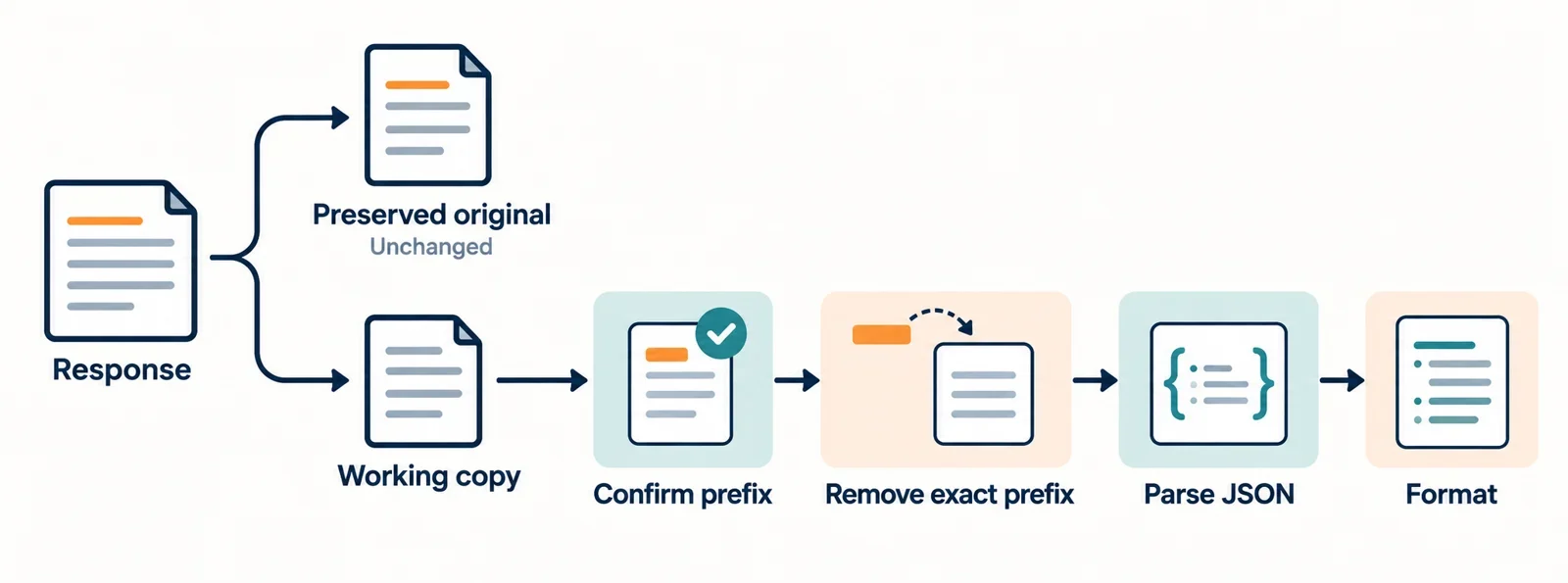
To inspect JSON with a confirmed anti-XSSI prefix, preserve the original response, remove exactly that prefix from a working copy, and parse and format the remaining text. If the expected prefix does not match the beginning of the response, stop extraction and investigate the mismatch.
A valid JSON payload can sit behind leading text that prevents the complete response from passing strict JSON parsing. Removing a confirmed prefix addresses that boundary; it does not repair errors within the payload or establish how a parser handles every value.
The workflow below keeps each stage visible: the response you received, the text you extracted, and the formatted result. A small executable example demonstrates the transformation without assuming that a formatter automatically recognizes anti-XSSI prefixes.
Recognize the prefix before changing the response
JSON parser breakers can serve as an XSSI defense. For inspection, the essential distinction is between the endpoint’s intentional leading sequence and the JSON payload that follows it. Unfamiliar characters at the beginning of a response do not establish that they are an anti-XSSI prefix.
Confirm the sequence through the endpoint’s documentation or its maintainer. Ask for the complete prefix, including any separator or line break, and establish which responses use it. A sample can help you compare characters, but appearance alone should not become the rule for deleting them.
Useful questions include:
- What exact sequence should appear at the beginning of this response?
- Does the documented sequence include a newline or other separator?
- Is that prefix expected for the particular response being inspected?
The complete response fails strict JSON parsing when a confirmed non-JSON prefix remains before the payload: the parser receives those leading characters as part of its input. A payload that looks valid farther down does not make the preceding text disappear.
Keep that explanation separate from your diagnosis of an unfamiliar response. If the documented prefix is absent, you have an unexpected input to investigate. Deleting characters until parsing succeeds would obscure that difference and leave you without a dependable extraction rule.
Preserve the original and inspect the response body
Keep an unchanged copy of the response body before attempting extraction. Create a separate working copy, and record the prefix you intend to match. That gives you a stable reference when you need to explain what changed or investigate an error after removal.
Treat the inspection stages as separate records:
| Stage | What to retain | What it helps you check |
|---|---|---|
| Original response | The unchanged body text | What was received |
| Working copy | The text selected for extraction | Whether the prefix matches |
| Extracted JSON | The remainder after one removal | What the parser received |
| Formatted output | The parser’s rendered result | How the accepted data is presented |
When a viewer offers raw and formatted representations, compare them. Check whether its raw view includes the prefix and whether its formatted view explains any transformation. A convenient presentation should not become your only record of the input.
If a viewer shows only a tree or formatted result, keep the original body separately. The rendered view alone does not tell you which characters were supplied to the parser or whether an earlier step changed them.
Preserving these stages also makes collaboration easier: another developer can compare the received response with the extracted text instead of trying to reconstruct the transformation from a screenshot of formatted output.
Remove exactly one confirmed leading sequence
Make extraction a narrow operation: compare the beginning of the working copy with the complete known prefix, then remove that sequence once. Include any separator that the endpoint documents as part of the prefix. Avoid adding cleanup steps merely because they make a particular sample pass.
Use this sequence:
- Establish the exact, nonempty prefix expected for the response.
- Check whether the working copy starts with that entire sequence.
- If it does not match, report a prefix mismatch and keep the text unchanged.
- If it matches, take the remainder immediately after the prefix.
- Pass that remainder to the JSON parser.
Do not use global replacement. A leading-prefix operation should leave matching text elsewhere untouched, including text within JSON strings. Do not search for the first opening brace or bracket either: that substitutes a guessed starting point for the endpoint’s documented boundary.
Deleting the first line unconditionally is similarly unreliable. It assumes that the prefix occupies exactly one line and that the payload starts afterward. Neither assumption follows from the mere presence of unfamiliar leading text.
Avoid trimming or normalizing the working copy before matching unless the response contract explicitly calls for it. Those operations change the input beyond the confirmed removal. If the prefix appears twice, remove only the single occurrence you were expecting and investigate the remaining text through the normal parsing step.
Walk through input, extraction, and formatted output
This JavaScript example declares its own illustrative prefix, DEMO_PREFIX:. It is a demonstration fixture, not a documented prefix for any real endpoint. The colon belongs to the declared sequence, and the same sequence also appears inside a string value so you can check that it remains untouched.
const prefix = "DEMO_PREFIX:";
const original = prefix +
  '{"message":"DEMO_PREFIX: keep this text","count":2,"items":[true,null]}';

const workingCopy = original;

if (!workingCopy.startsWith(prefix)) {
  throw new Error("Expected prefix was not found at the start.");
}

const jsonText = workingCopy.slice(prefix.length);
const value = JSON.parse(jsonText);
const formatted = JSON.stringify(value, null, 2);

console.log("Preserved response:\n" + original);
console.log("Extracted JSON:\n" + jsonText);
console.log("Formatted output:\n" + formatted);
The preserved response is:
DEMO_PREFIX:{"message":"DEMO_PREFIX: keep this text","count":2,"items":[true,null]}
The extracted JSON is:
{"message":"DEMO_PREFIX: keep this text","count":2,"items":[true,null]}
The expected formatted output is:
{
  "message": "DEMO_PREFIX: keep this text",
  "count": 2,
  "items": [
    true,
    null
  ]
}
Prefix matching and removal happen explicitly before JSON.parse receives the text. The response is parsed as data; it is not executed as code. The string value retains DEMO_PREFIX: because extraction affects only the confirmed beginning of the response.
Changing the fixture’s leading sequence without changing prefix should trigger the explicit mismatch error before parsing. Keeping the prefix but supplying malformed payload text should instead reach the parsing stage and fail there. Those are useful separate checks of the workflow.
This example demonstrates manual extraction followed by parsing and formatting. It does not demonstrate automatic prefix detection or removal by an inspector. For a real response, replace the fixture values only after confirming the endpoint’s contract.
Investigate errors that remain after extraction
First identify which stage failed. A prefix mismatch means the working copy did not begin with the sequence you expected. A parsing failure after a successful match means the extracted remainder was not accepted as JSON. Treating both as a generic formatting error makes it harder to locate the actual mismatch.
For a prefix mismatch, compare the original beginning with the documented sequence, including separators and line breaks. Confirm that you are inspecting the intended response. Do not proceed by trying progressively shorter prefixes until something parses.
For a parsing failure, inspect the extracted text beside the original. Check whether the body appears complete, whether unexpected text remains before or after the intended payload, and what the parser reports at the failure location. Compare the payload with the endpoint’s expected response. Avoid appending punctuation or deleting content merely to obtain formatted output; those actions would be payload repairs requiring a separate explanation.
Identify the coordinate system before translating an error
Record whether an error location refers to the extracted JSON, the working copy, or the preserved response. In the example, JSON.parse receives jsonText, so any location it reports needs to be interpreted against that input.
For absolute offsets using the same counting units and numbering convention, translating from extracted text to the original means adding the removed prefix’s length. Verify those conventions before doing the arithmetic; do not assume every tool reports positions alike.
If the prefix contains line breaks, account for them when translating line and column locations. Check the diagnostic’s line numbering, column counting, and treatment of line endings. Keep the reported location and its input stage alongside any translated location so another reader can reproduce your comparison.
Check duplicate keys and number preservation
Successful extraction establishes that the expected leading sequence was removed. Successful parsing establishes that the chosen parser accepted the remainder. Neither result, by itself, documents how duplicate keys or numeric values are handled during inspection.
Before relying on the formatted result, compare the parser’s documented behavior with any policies stated by the inspector. If the inspection pipeline is unclear, ask which parser processes the text and whether any transformation happens before the formatted or tree view is produced.
| Concern | What to establish | What to compare |
|---|---|---|
| Repeated property names | Whether the tool rejects, reports, or resolves them, and how | Original occurrences against the rendered result |
| Large numeric values | Which values remain exact and how unsupported values are handled | Original numeric text against the output |
| Diagnostics | Whether warnings or errors accompany those cases | The diagnostic panel and formatted view together |
These are questions to verify, not promises about a particular implementation. Do not infer a duplicate-key policy from an ordinary object with unique names. Likewise, formatting a small number successfully does not establish how the same pipeline handles a much larger value.
The executable fixture deliberately uses unique property names and a small count. It demonstrates the extraction boundary without resolving those separate parser-policy questions. Use representative cases from your actual requirements when checking the documented behavior, and retain their original text for comparison.
If the documentation does not answer a question, leave that behavior unresolved instead of describing the formatted result as fully preserving the input. You can still identify whether prefix matching succeeded, which text reached the parser, and where inspection stopped. A useful inspection report states those findings clearly and keeps any remaining uncertainty attached to the specific behavior that needs verification.