On this page
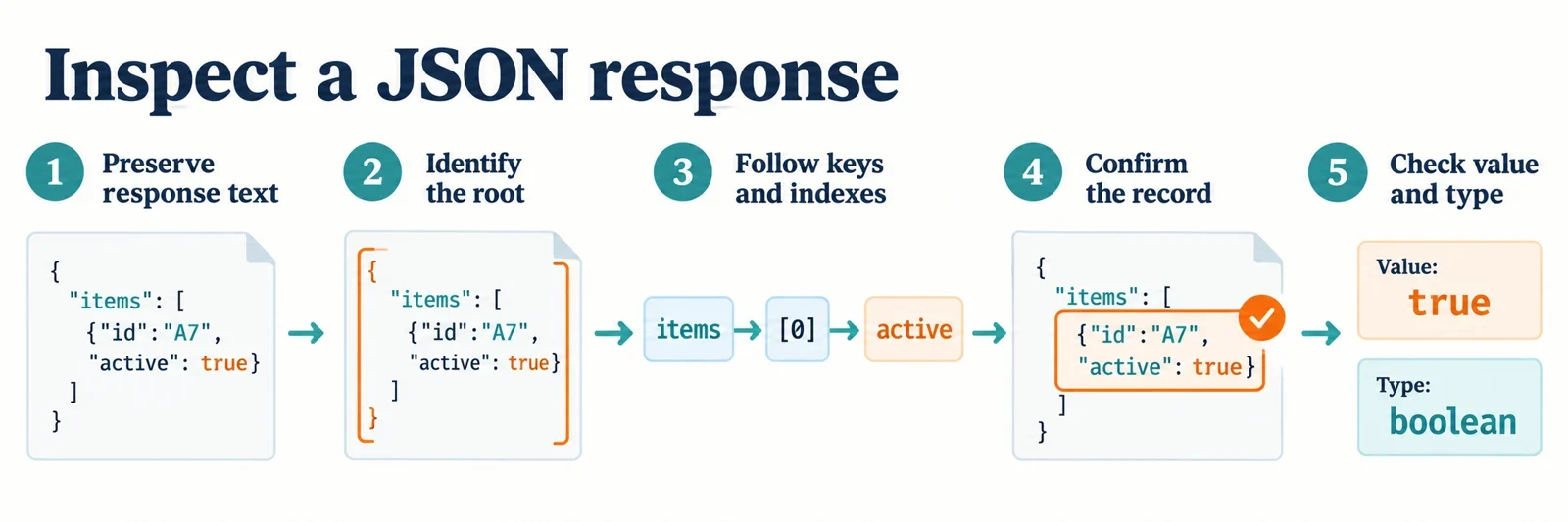
To inspect a nested JSON API response, preserve the response body, identify its root, and follow one object key or array index at a time. Confirm the selected record, check whether the field is present, and inspect its value and type. A matching word becomes useful evidence when you can also explain exactly where it occurs.
The synthetic examples below provide complete paths and expected results for navigation. They also show how to investigate a mismatch without changing the input prematurely. Keep the original response text available throughout, particularly when checking numeric identifiers or repeated property names: understanding the response structure and verifying a parser’s behavior are separate parts of the investigation.
Start with the correct response body
Begin with the network request associated with the action you are investigating. Select its response body and look for a recognizable field or record identifier. Use that detail to confirm that you have the relevant response before copying it into an inspector.
Keep request parameters, headers, and the response body separate during your investigation. For a question about a returned record, work from the body containing the returned data. Avoid constructing an inspection input by combining text from several views.
Save an unchanged copy before formatting or parsing. JSON is a text-based format for structured data, so the original spelling and punctuation provide useful comparison material when investigating syntax, numeric tokens, or repeated property names.
Use a JSON formatter to prepare a readable working view. Paste the JSON body itself; keep the JavaScript statements used in this guide separate from that input.
If application code uses Response.json(), its promise resolves with the result of parsing the response body text as JSON. Label that result as the parsed representation in your notes. Keep it alongside the original body so you can distinguish observations about the input text from observations about the parsed result.
Identify the root and map the containers
Inspect the outermost value before writing a path. A JSON document can contain an object, an array, or a single primitive value. The first access step must fit that starting point.
| Example response | Root | First inspection step |
|---|---|---|
{"items":[]} |
Object | Select the items property |
[{"id":"r1"}] |
Array | Select a position, such as [0] |
"ready" |
Primitive string | Inspect the root value itself |
JSON object property names are strings enclosed in double quotes. Arrays are ordered lists, and their indexes start at zero. Selecting an item from a root array therefore begins with an array index.
Use indentation to map the containers around the desired value. If your viewer offers expandable branches, open the root and then the relevant branches one at a time. At each level, ask whether the next selection requires a property name or a position.
Check each selected child before continuing. An array can contain elements of different JSON types, so its first element does not establish the structure of every later element.
Trace one complete path through keys and indexes
Use this synthetic fixture in a JavaScript environment. The following sections reuse payload.
const payload = JSON.parse('{"result":{"items":[{"id":"r1","tags":["ready","queued"]},{"id":"r2","tags":[]}]}}');

payload.result.items[0].tags[1];
// Expected: "queued"
Read the expression from left to right. Each step selects a child of the value reached by the previous step.
| Expression | Selected value |
|---|---|
payload.result |
Object containing items |
payload.result.items |
Array containing two records |
payload.result.items[0] |
First record, with identifier r1 |
payload.result.items[0].tags |
Array ["ready","queued"] |
payload.result.items[0].tags[1] |
String "queued" |
The first index, [0], selects a record from items. The second index, [1], selects a tag from that record’s tags array. The indexes operate on different containers.
When a real response does not match your expectation, inspect these shorter expressions in order. Find the first point where the selected value or container differs. That observation narrows the investigation to a particular step: a property name, wrapper, record position, or unexpected child structure.
Inspect individual records and consecutive array indexes
Select a whole record before inspecting its individual fields. In the same fixture, index 1 selects the second item:
payload.result.items[1];
// Expected: {"id":"r2","tags":[]}

payload.result.items[1].id;
// Expected: "r2"

payload.result.items[1].tags;
// Expected: []
This gives you two useful checks: the selected record has identifier r2, and its tags field contains an empty array. The first record’s two tags do not describe the second record.
Arrays can also contain arrays. Consecutive indexes then navigate successive levels:
const grid = [["a", "b"], ["c"]];

grid[1];
// Expected: ["c"]

grid[1][0];
// Expected: "c"
Here, [1] selects the second inner array, and [0] selects that array’s first element. Read the expression as two selections, naming the container reached after each one.
When documenting a lookup, include the intermediate record or inner array if that makes the result easier to verify. A short intermediate example can reveal a mistaken outer index before you investigate the final field.
Distinguish literal property names from nested paths
Inspect the actual property names before interpreting punctuation as navigation. This synthetic object contains both a literal "user.name" property and a separate user object:
const names = JSON.parse('{"user.name":"literal entry","user":{"name":"nested entry"}}');

names["user.name"];
// Expected: "literal entry"

names.user.name;
// Expected: "nested entry"

names["user"]["name"];
// Expected: "nested entry"
In names["user.name"], the quoted string selects one property at the root. The period belongs to that property’s name.
In names.user.name, the expression selects user first and then selects name inside it. The final example follows the same two-step path using bracket syntax.
These expressions look similar when written casually, but they select different entries in this fixture. Preserve brackets and quotation marks when sharing a lookup. A report that says only “check user.name” leaves the intended interpretation unclear; an exact expression and expected value make the distinction reviewable.
Find the intended occurrence and confirm the record
Searching for a value can reveal candidate locations. Confirm the surrounding branch before treating a match as the answer. In this fixture, "queued" appears in both a summary and an individual record:
const matches = JSON.parse('{"summary":{"status":"queued"},"items":[{"id":"r1","status":"ready"},{"id":"r2","status":"queued"}]}');

matches.summary.status;
// Expected: "queued"

matches.items[1].status;
// Expected: "queued"

matches.items[1].id;
// Expected: "r2"
Both status expressions return the same string. The second expression selects the status belonging to record r2; the first selects the summary status.
After locating a match, inspect its parent record and confirm the identifier. Write down the complete path, record identifier, and observed value together. A useful note for this example is: matches.items[1].status, record r2, value "queued".
An array index identifies a position within the inspected response. Before reusing that index with another response, verify the identifier again. Ask two questions when reviewing a match: “Is this the intended branch?” and “Does this selected record have the identifier I expected?”
Check types, missing fields, and empty containers
Inspect presence, value, and type separately. This fixture places several distinct cases next to one another:
const sample = JSON.parse('{"nothing":null,"blank":"","list":[],"details":{},"quoted":"123","count":0,"enabled":false}');

sample.nothing;
// Expected: null

sample.quoted;
// Expected: "123"

sample.count;
// Expected: 0

sample.enabled;
// Expected: false
There is deliberately no missing property in the object. Record that field as absent without assigning it a runtime result.
| Property | Observation in this fixture |
|---|---|
missing |
Absent from the object |
nothing |
Present with value null |
blank |
Present as an empty string |
list |
Present as an array with no elements |
details |
Present as an object with no properties |
quoted |
Present as the string "123" |
count |
Present as the number 0 |
enabled |
Present as the boolean false |
A property explicitly set to null is still present. The value "123" is a string. Zero and false are also explicit values in this fixture, so report their values and types when describing the record.
For an empty collection, first confirm the record and property you selected. Then describe the observation precisely: an empty array, an empty object, or an absent field.
Inspect sibling records before drawing conclusions about the collection. In the earlier payload fixture, r1 has two tags while r2 has none. That difference is visible only when you check both records.
Separate invalid JSON from an incorrect lookup
First establish whether the body can be parsed. A syntax problem and an unexpected nesting level require different corrections.
A syntax problem
Consider this input:
{"items":[{"id":"r1"}],}
Expected inspection outcome: invalid JSON. The comma immediately before the final closing brace is a trailing comma, which JSON objects and arrays cannot contain. JSON syntax also does not allow comments. The explanatory comments in this guide’s JavaScript examples appear outside the quoted JSON input.
Response.json() can reject with a SyntaxError when the response body cannot be parsed as JSON. Keep the original body associated with that failure so you can inspect the actual text rather than a reconstructed example.
A structural mismatch
This different fixture has an additional wrapper:
const wrapped = JSON.parse('{"data":{"result":{"items":[{"id":"r1"}]}}}');

wrapped.data.result.items[0].id;
// Expected: "r1"
The root has a data property. Its child contains result; the root itself has no result property. A lookup planned around wrapped.result therefore starts at the wrong level. Include the data step to reach the intended record.
Record the parsing outcome and the first structural mismatch separately. If the body parses, inspect the actual containers before editing the response. If parsing fails, investigate the original text before attempting a nested lookup.
Compare raw tokens with parsed values
When investigating a suspected numeric discrepancy, preserve the original token and record the actual parsed result from the environment under investigation. Use this synthetic input as a comparison exercise:
const numberText = '{"id":9007199254740993}';
const parsedNumber = JSON.parse(numberText);
const observedId = parsedNumber.id;
The original numeric token is 9007199254740993. Inspect observedId and write down the displayed result. Confirm the parser’s documented number handling before interpreting that comparison or making a claim about precision.
| Evidence to retain | What to record |
|---|---|
| Original body text | The exact token supplied for id |
| Complete lookup | parsedNumber.id |
| Observed parsed value | The result displayed in the environment being checked |
| Parser details | Its identity and documented numeric behavior |
If an identifier appears inconsistent, ask the API owner how it is intended to be represented. Keep the original response available while investigating; changing a local example does not establish what the API returned.
Check repeated-name handling explicitly
Preserve this separate synthetic input as text:
{"status":"ready","status":"queued"}
It contains two occurrences of the property name status, with different values. Check the chosen parser’s documentation and observed behavior to determine how it handles that input. Record whether it accepts the text, what it exposes, and whether it reports a problem. Attribute any conclusion to that parser and its documented policy.
For escentmachine or another inspector, verify the stated policies before relying on token preservation or duplicate rejection. Ask whether numeric tokens are preserved, whether repeated names are rejected, and how any accepted duplicates are presented.
Finish the investigation with a compact record of the original text, complete path, selected identifier, observed value, and relevant parser behavior. Those details let another reader follow the lookup and assess the mismatch.