On this page
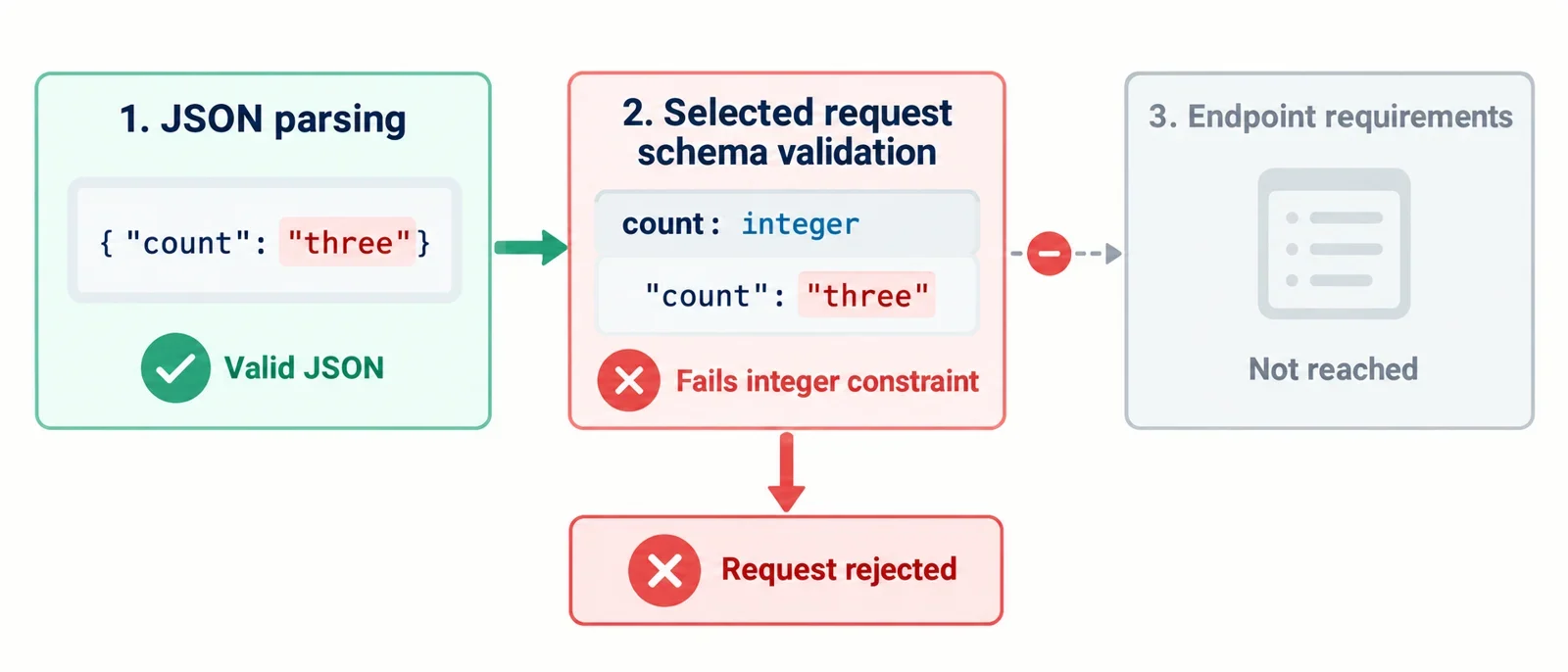
When your JSON tool reports success but an API reports a schema error, compare the exact transmitted body with the request schema for that endpoint, HTTP method, and API version. Use the reported location and rule to focus the investigation: check required fields, value types, allowed values, and restrictions on unexpected properties.
The walkthrough below uses one explicitly fictional contract and gives an expected result for each candidate body. Its baseline passes the example’s stated requirements; small changes produce specific mismatches that you can diagnose and correct. For your own request, keep the original body and response available so every correction addresses the rejection you actually received.
Identify the schema for the request you actually sent
Before editing the body, establish what you are comparing. Record the endpoint, HTTP method, API version, and documented request schema. Confirm that the schema belongs to that operation and describes its request body.
Inspect the serialized body the client actually sent. Keep that body alongside the value shown in your editor so you can establish whether you are investigating the same input. Preserve the original while making corrections.
Keep these details together:
- The operation and version being called.
- The applicable request schema and referenced requirements.
- The serialized request body.
- The response body and reported validation details.
- The schema dialect and relevant validator settings, if you control the check.
This gives every proposed edit a concrete basis. If an error reports a missing property, inspect both the selected schema and the object actually sent. If the response is less specific, preserve its wording while investigating the applicable requirement.
The first question to resolve is: Am I checking this request against the contract for this exact operation? Establish that connection before changing individual values. A comparison against another operation’s documentation leaves the reason for the observed rejection unresolved.
Separate valid JSON syntax from schema conformance
Keep the JSON tool’s reported result separate from the API’s reported schema result. When those reports differ, identify what each tool was asked to check instead of treating their success and failure messages as interchangeable.
| Report you are investigating | What to inspect next |
|---|---|
| Parser error | Preserve the exact input and the parser’s diagnostic. |
| Inspector input restriction | Check the inspector’s documented input requirements. |
| Schema error | Compare the indicated part of the body with the selected request schema. |
| Endpoint rejection | Read the response details alongside the operation’s documented requirements. |
If your tool offers JSON formatting, use it to inspect the body. A clearer layout can help you locate a property, examine its containing object, and compare the submitted structure with the request documentation. Treat the formatted output as an inspection aid. For a schema verdict, use a check explicitly associated with the applicable schema.
Before drawing a conclusion from any success message, ask: Which input and which check produced this result? Preserve the endpoint response while you investigate; it identifies the rejection that your proposed correction needs to address.
Establish an explicit example schema
Use this fictional schema throughout the walkthrough. It does not describe a real endpoint:
{
  "type": "object",
  "required": ["count", "mode"],
  "properties": {
    "count": {"type": "integer"},
    "mode": {"enum": ["auto", "manual"]}
  },
  "additionalProperties": false
}
For this example, the contract expects an object with these requirements:
| Part of the example | Requirement |
|---|---|
| Required properties | Both count and mode must be present. |
count |
Supply an integer. |
mode |
Supply either "auto" or "manual". |
| Other root properties | Additional properties are disallowed. |
The baseline body is:
{"count":2,"mode":"auto"}
Expected schema result: pass. Both required properties are present, count has the integer value 2, mode is one of the two allowed values, and there are no additional properties.
All results below are expected outcomes for this fictional contract, assuming no type coercion. Keep the schema fixed while comparing candidates. That makes each changed property traceable to a stated requirement rather than to an unexplained change in the checking configuration.
Check required fields before changing values
Start with this candidate:
{"mode":"auto"}
Expected schema result: fail. The root object is missing count, which appears in the example’s required list. Adding "count":2 produces the passing baseline.
Now compare a different candidate:
{"count":null,"mode":"auto"}
Expected schema result: fail. Here, count is present. The mismatch is its value: null does not satisfy this example’s integer requirement. Replacing null with 2 resolves that mismatch and produces the baseline again.
These candidates need different explanations even though the same property is involved:
| Candidate condition | Diagnosis in this example | Focused correction |
|---|---|---|
count absent |
Missing required property | Add count with an acceptable value. |
count supplied as null |
Present value fails the integer constraint | Replace the value with an integer. |
Apply the inspection inside nested data
For a real request with nested objects, locate the containing object identified by the error and compare that object with its documented requirements. Check the relevant occurrence of the property, especially when its name appears in several places.
Keep absence, explicit null, and an empty supplied value distinguishable in your notes. For an empty value, verify what that particular field’s contract permits before choosing a replacement.
Compare the actual value type with the required type
Compare these complete inputs under the fictional schema, without type coercion:
| Candidate | Supplied count |
Expected result |
|---|---|---|
{"count":"2","mode":"auto"} |
String value "2" |
Fail: count must be an integer. |
{"count":2,"mode":"auto"} |
Integer value 2 |
Pass. |
A note that says only “count is 2” loses the distinction that explains this failure. Preserve both the value and its type when describing the mismatch.
The focused correction is to supply the integer 2 for count. With that edit, both required properties are present, the integer constraint is satisfied, the mode is allowed, and no unexpected property remains.
For a real endpoint, confirm the required representation in its request contract. Check the validator’s coercion settings before interpreting a local result, and record the settings actually used. Do not apply the example’s correction indiscriminately to other fields; determine what each field requires.
After changing the client input, inspect the serialized body again. Compare the corrected representation with what the client would actually send.
Check allowed values after checking types
Use this candidate to investigate an allowed-value mismatch:
{"count":2,"mode":"AUTO"}
Expected schema result: fail. The fictional contract allows exactly "auto" and "manual" for mode. The supplied value "AUTO" is outside that set.
Compare it with the baseline:
{"count":2,"mode":"auto"}
Expected schema result: pass. Changing the mode to the listed value "auto" resolves this candidate’s mismatch. Both versions supply a string for mode; the relevant distinction here is membership in the example’s allowed set.
For a real request, take permitted values from the endpoint’s contract and preserve their exact written form. If case handling or normalization is unclear, resolve that question before choosing a correction.
A useful explanation names the supplied value and the permitted choices: “The request supplied AUTO; this example permits auto or manual.” That identifies the mismatch more precisely than saying only that the mode is invalid.
Inspect unexpected properties at the correct object level
Consider this candidate body:
{"count":2,"mode":"auto","debug":true}
Expected schema result: fail. In this fictional schema, the root object’s declared properties are count and mode, and its explicit additionalProperties:false rule disallows the added debug property.
Remove that property to obtain:
{"count":2,"mode":"auto"}
Expected schema result: pass. The corrected body meets all the example’s stated requirements. The removal has a specific justification: debug conflicts with the restriction on additional root properties.
For a real request, locate the restriction associated with the reported property before removing anything. Identify both the containing object and the schema portion that applies there. With nested data, inspect the relevant object separately from the root.
Ask: Does the applicable schema explicitly restrict extra properties at this location? Avoid assuming that every API rejects unfamiliar names. If the response and selected schema appear inconsistent, recheck the operation, version, and schema selection before making further edits.
Turn a validation error into a focused correction
Keep one compact record connecting the error to the proposed edit. Preserve the validator’s original wording alongside your explanation.
For the candidate {"count":"2","mode":"auto"}, the completed example diagnosis is:
| Record | Diagnosis for the fictional candidate |
|---|---|
| Location in the body | The root object’s count property. |
| Violated rule | The integer constraint declared for count. |
| Expected constraint | An integer value. |
| Supplied value | The string "2". |
| Focused correction | Replace "2" with 2. |
| Expected result afterward | Pass against the unchanged example schema. |
The location above is descriptive; it is not a fabricated validator message. For an actual error, copy the reported location exactly and interpret it using that validator’s documented notation. For nested objects or arrays, establish which containing object or array position it identifies. Also check whether the location refers to the submitted body or the schema.
The correction is complete because the resulting body is {"count":2,"mode":"auto"}: both required properties are present, the count meets its constraint, the mode is allowed, and there are no extra properties.
Apply the same method to your real response. Change one identified mismatch, validate again against the same schema and settings, and retain the new result. If another error remains, use its location and rule to select the next edit.
Understand what a schema pass establishes
Close the fictional example by following a candidate with two mismatches through two focused repairs:
| Stage | Complete payload | Expected schema result |
|---|---|---|
| Starting body | {"count":2,"mode":"AUTO","debug":true} |
Fail: the mode is outside the allowed set and debug is disallowed. |
| Correct the mode | {"count":2,"mode":"auto","debug":true} |
Fail: the additional debug property remains. |
Remove debug |
{"count":2,"mode":"auto"} |
Pass: all stated example requirements are satisfied. |
The intermediate failure has a clear explanation: changing mode resolves the allowed-value mismatch while leaving the additional-property mismatch. The final body satisfies both required fields, the integer constraint, the allowed mode values, and the restriction on extra properties.
Keep this expected pass attached to the fictional contract. For a real investigation, record the exact payload, selected schema, validator settings, and observed result together. Report those details when sharing the correction so another developer can reproduce the comparison.
If an endpoint still rejects the request after your local check passes, return to its response details and documented application requirements. Verify that the checked body matches the transmitted body and that the schema belongs to the correct operation and version.
Use the HTTP status alongside the response explanation when choosing the next investigation step. Avoid treating the status alone as a diagnosis. The practical goal is a correction connected to an observed mismatch, followed by a fresh check of the request you intend to send.