On this page
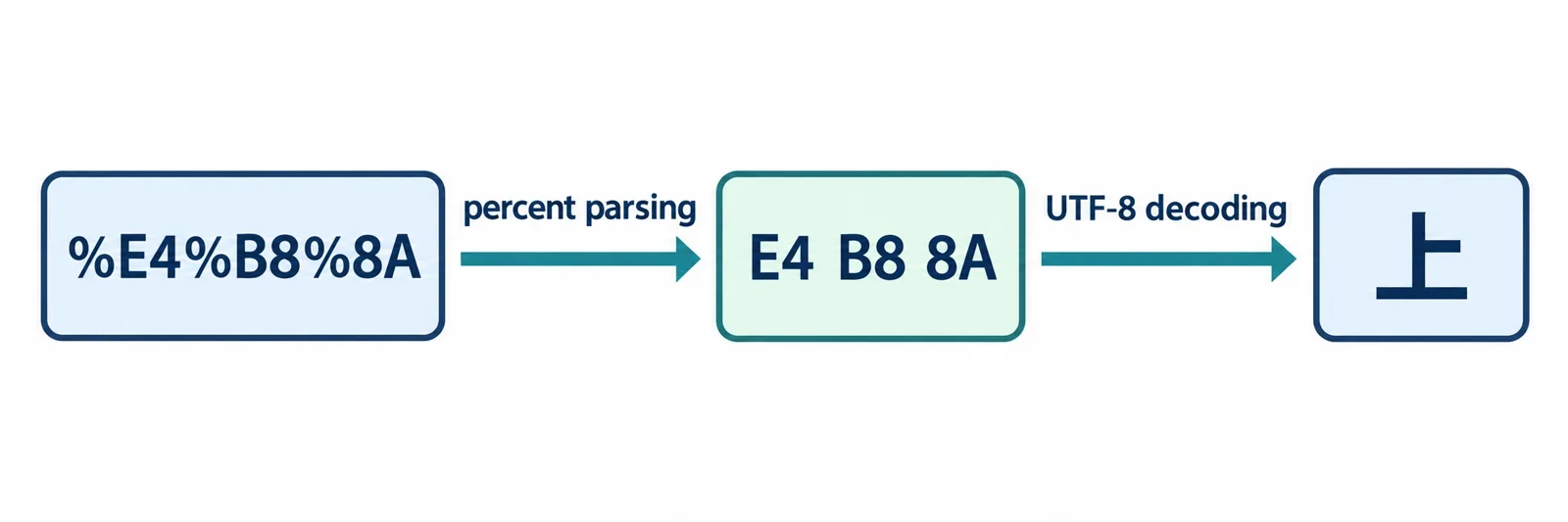
To inspect percent-encoded UTF-8, first identify the URL component you are examining. Then track two operations separately: converting percent escapes into bytes and interpreting those bytes as text. Preserve the original input so that every transformation remains explainable.
Start with a known text-and-encoding pair, then compare the intermediate representations when something goes wrong. An unfinished escape needs a different investigation from a reported text-decoding failure. Query conventions and earlier processing also deserve separate checks: establish what the parser has already done before applying another conversion. A useful inspection record identifies the stage, preserves its input and output, and gives the reader a concrete next action.
Follow percent escapes from bytes to text
A percent escape uses a percent sign followed by two hexadecimal digits. Treat that spelling as a representation of a byte. The subsequent text interpretation is a separate operation, so counting escape triplets does not tell you how many written characters the result contains.
Use this multilingual pair as a reference fixture:
Text:     上海+中國
Encoded:  %E4%B8%8A%E6%B5%B7%2B%E4%B8%AD%E5%9C%8B
The opening character makes the intermediate representation visible:
| Representation | Reference value |
|---|---|
| Percent-encoded input | %E4%B8%8A |
| Represented bytes | E4 B8 8A |
| Intended text | 上 |
This is an implementation-neutral input-and-output example. Use it to compare the values shown by your chosen inspection tool without assuming the behavior of a particular programming interface.
Keep the intermediate evidence
Record the escaped input, represented bytes, and resulting text separately. If the displayed text differs from the reference, compare the preceding stages before changing decoder settings. Establish whether the tool received the original spelling and whether its byte view matches the reference.
The full fixture also includes a literal plus sign represented as %2B. Keep that encoded spelling visible when investigating query handling. It provides a useful comparison with an unescaped plus sign, whose treatment requires a separate decision about the input’s context.
Parse the URL before choosing what to decode
Begin by naming the object under inspection: a complete URL, one path segment, a query name, or a query value. That choice determines which substring you intend to interpret as data. A question mark introduces the query string, but the rest of the extraction should follow the selected parser’s documented rules.
Preserve the complete input alongside the extracted component. Ask whether extraction returned its original spelling or an already transformed value. Passing a transformed value into another decoder should be a deliberate step with a stated purpose.
| Object | Question to resolve |
|---|---|
| Complete URL | Which parts does the parser identify as structure? |
| Path segment | What exact substring belongs to the selected segment? |
| Query name | What processing occurred during extraction? |
| Query value | Which decoding and query conventions apply? |
Compare boundaries before changing spellings
Use %2F, %3F, and %26 as exploratory boundary fixtures. For each, record the original component, the documented transformation, and the parser’s resulting division of the input. Do not assume that whole-URL and component operations share the same contract.
To investigate processing order, compare two preserved copies: one parsed before the proposed transformation and one transformed before parsing. Look for changes in the extracted parts. If a proposed transformation changes apparent boundaries, resolve which representation the application is intended to parse before adopting that order.
Handle query plus signs and repeated parameters deliberately
Both %20 and + appear as spellings for spaces, but that observation alone does not establish the rule for a particular URL component. Identify the query convention before assigning a meaning to an unescaped plus sign.
For a workflow that explicitly selects a plus-as-space convention, document that choice separately from percent conversion. For a plus sign in another component, verify that component’s rule independently.
Use this query-shaped fixture to organize the investigation:
q=a+b%2Bc&tag=one&tag=two
It places an unescaped plus and %2B together, and includes two occurrences of tag. The encoded multilingual reference establishes %2B as a representation of a literal plus sign; it does not establish how every query interface processes the entire fixture.
Preserve each occurrence
Before choosing a convenient application representation, keep an inspection record of the candidate entries:
| Occurrence | Name spelling | Value spelling |
|---|---|---|
| 1 | q |
a+b%2Bc |
| 2 | tag |
one |
| 3 | tag |
two |
Compare that record with the selected parser’s documented output. Check whether every occurrence remains available and whether the order matches the input. Avoid collapsing repeated names into one diagnostic value before deciding how the application should handle them.
For the q value, record plus interpretation and percent conversion as distinct operations. This makes an unexpected space or plus easier to trace to a specific rule.
Recognize incomplete and nonhexadecimal escapes
Inspect percent syntax before attempting to explain a text-decoding failure. An escape requires two hexadecimal digits after the percent sign. The following examples identify spelling problems without making assumptions about the author’s intended text:
| Input | Observable problem | Useful diagnostic |
|---|---|---|
% |
Both following digits are missing | Escape ends before its hexadecimal pair |
%A |
One digit is missing | Escape lacks its second hexadecimal digit |
%G1 |
The pair includes a nonhexadecimal character | Identify G as the offending character |
A useful error report preserves the input and highlights the relevant span. Name the representation used for the location: the complete original string or an extracted component. Also establish the tool’s position-counting convention before transferring a reported location into another interface.
Explain the requirement without guessing a correction
For %A, say that a second hexadecimal digit is required. Do not append a guessed digit merely to produce readable output. Ask the producer for the intended value when the missing information matters.
A literal percent sign has the encoded representation %25. That gives you a supported correction when the intended data is known to contain a literal percent sign. It does not justify replacing every problematic percent sign automatically. First determine whether the input intended literal data or an escape.
Recognize valid escapes that contain invalid UTF-8
Inspect a reported text-decoding failure
When a tool reports a UTF-8 problem, inspect the input to that specific operation. First check whether every percent sign in the selected component has its required hexadecimal pair. Capture the represented bytes separately, then record what the text decoder actually received and reported.
Use the following worksheet to organize the investigation:
| Checkpoint | Evidence to record | Next action |
|---|---|---|
| Escape syntax | Original component and syntax-check result | Resolve any incomplete or nonhexadecimal escape |
| Byte conversion | Exact byte sequence produced | Compare it with the component’s escaped spelling |
| Text interpretation | Decoder, selected settings, and actual result | Consult the documented rule associated with the report |
| Error location | Reported position and the representation it describes | Locate the corresponding span in the preserved input |
If the decoder rejects the submitted bytes, retain its complete diagnostic. Before assigning a detailed UTF-8 classification, verify the applicable validation rule in that decoder’s documentation. Ask which byte or span it identifies and how the reported location is counted.
Keep the observation and its explanation in separate fields. Record an observed rejection immediately; add a specific cause when the captured bytes and documented rule establish it. Likewise, verify the interface’s exception name before using that name in application logic.
This workflow gives the next person a reproducible input, an identifiable processing stage, and a focused question to resolve. Preserve the decoder settings with the record so that a later comparison uses the same conditions.
Choose explicit rejection or recovery
Select a failure policy before turning malformed input into an application value. The policy should explain what processing stops, what evidence remains available, and whether a displayed result includes substitutions.
| Choice | Evidence to preserve | Decision to expose |
|---|---|---|
| Reject conversion | Original input and diagnostic | Which stage prevented completion |
| Retain raw data | Original spelling and any completed intermediate result | Which stages actually succeeded |
| Offer a recovery preview | Original input, transformed output, and change record | What was substituted or left unresolved |
For rejection, give the reader an actionable next step. An incomplete escape calls for checking the producer’s intended spelling. A reported text-validation failure calls for examining the extracted bytes and the expected text encoding.
Separate the two recovery decisions
Recovery from malformed percent syntax needs an explicit rule for producing or retaining data at that stage. Replacement during text interpretation needs a separate rule governing the byte-to-text result. Document both when a workflow offers both.
If a preview uses substitutions, retain the original input alongside it. Explain which parts of the preview differ from the submitted data. If the preview is later copied or saved, make the selected transformation visible at that point too.
A replacement result should not be presented as a reconstruction of the author’s original text. Where information is missing, record the uncertainty rather than disguising a chosen substitute as recovered evidence.
Locate the first unwanted transformation
When final text looks wrong, compare adjacent stages. Repeatedly applying a decoder to the final value makes it harder to explain which operation was responsible for a change.
Capture a record such as:
Original input:
Selected component and original spelling:
Value returned by component extraction:
Percent-decoded bytes:
Decoded text:
Query convention:
Failure stage, location, and next action:
At each boundary, identify the operation and compare its input with its output. If extraction already changed the spelling, investigate that operation before adding another conversion. If the byte representation matches the intended input, focus the next investigation on text interpretation.
Investigate an apparent extra layer
Use %252F to examine an additional encoding layer. Because %25 represents a literal percent sign, an operation defined to convert that triplet while retaining the following 2F produces %2F:
Input spelling:       %252F
Convert %25 to %:     %2F
This explains one transformation. It does not establish that a second decoding pass is intended.
Determine the intended number of passes from the input’s provenance. Ask whether the producer deliberately placed an encoded representation inside another value and whether an earlier consumer already transformed it. Preserve the input and output of each authorized pass.
Avoid a rule that continues decoding until no percent signs remain. Instead, state the purpose of each pass and stop when the agreed processing contract is complete.
Distinguish normalization from text decoding
Give normalization its own purpose and processing record. A request to display readable text does not specify which URL spellings a storage or comparison policy should preserve.
The mapping %25 to a literal percent sign answers what that escape represents. It does not decide whether a particular normalization policy should rewrite the spelling. Similarly, knowing that a question mark introduces the query string does not establish permission to transform punctuation before component extraction.
| Task | Question to resolve |
|---|---|
| Interpret encoded text | Which bytes and intended text are involved? |
| Normalize a representation | Which rewriting rule applies, and for what purpose? |
| Preserve component boundaries | Which representation should the parser receive? |
| Apply a provider transformation | What input-and-output contract does that provider document? |
If a policy distinguishes unreserved characters from reserved separators, obtain its actual character groups and scope. Ask which components it covers and whether it governs comparison, storage, display, or application input. Do not invent character classifications to fill an undocumented gap.
Keep provider-specific transformations separate from general text interpretation. Save their before-and-after values so a spelling change remains visible.
Before accepting the result, check that the record explains the original input, the selected component, the byte conversion, the text outcome, and any additional rewriting. Every changed representation should have an identifiable operation and a stated reason.