Contents
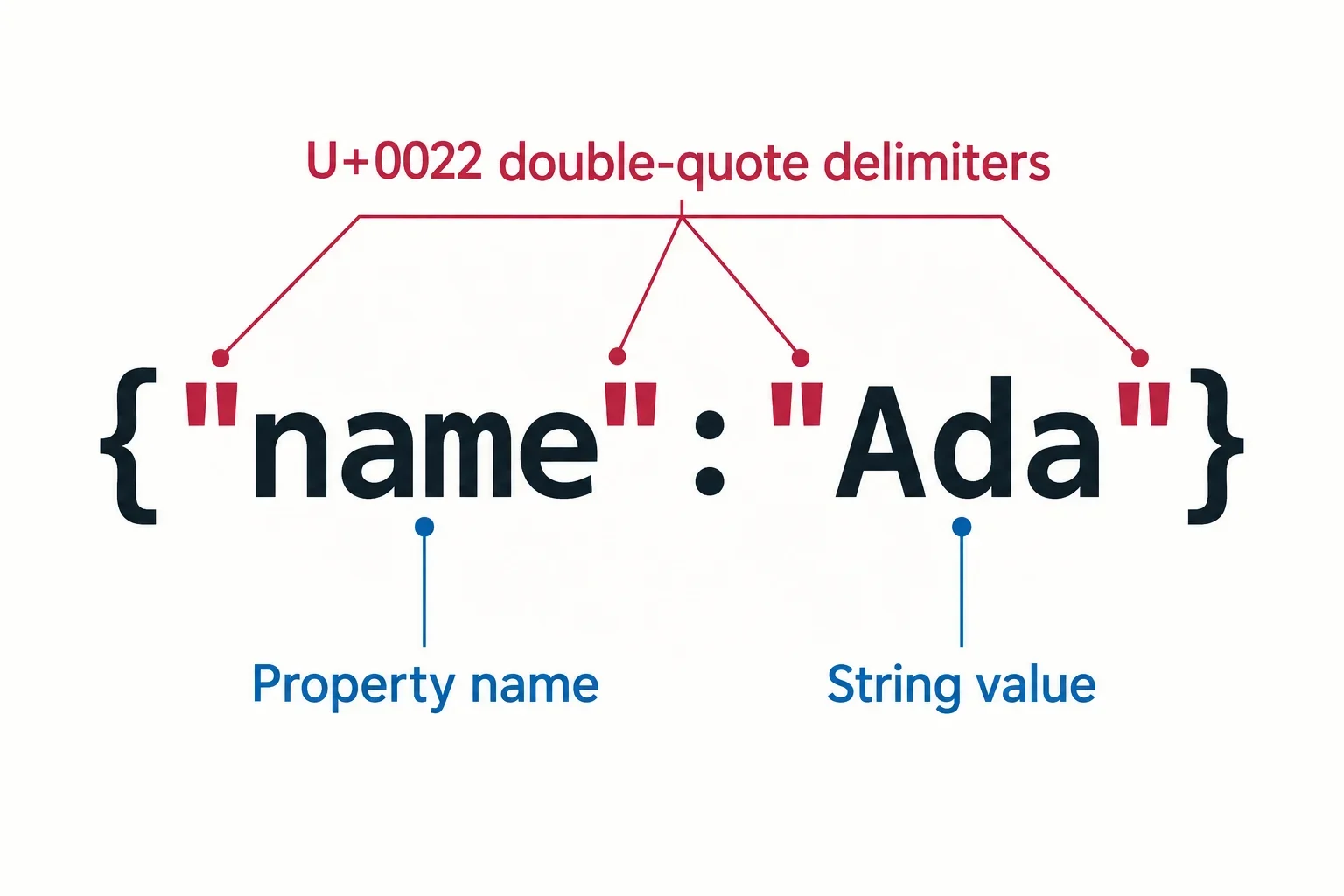
JSON requires straight double quotes around property names and string values because those delimiters are part of its grammar. Single quotes and unquoted names can appear in JavaScript object literals, but those examples do not become valid JSON merely because JavaScript accepts them.
The practical fix is to identify which characters form the document’s structure and which belong to the data. An apostrophe in O'Reilly should survive the correction. A double quote inside a message needs escaping. The examples below show the text to inspect, the expected parsed values, and when serializing an existing object avoids mistakes caused by editing quotation marks by hand.
Why double quotes are required by JSON's grammar
JSON defines strings using the straight double quotation mark, U+0022. An object member name must be a string, so its name also needs these delimiters. This makes {"name":"Ada"} valid JSON: both the name and the string value have the required quotes.
This requirement serves a different purpose from choosing indentation. You can present that example compactly or spread it across several lines:
{
  "name": "Ada"
}
Both presentations express the same data. Removing the quotation marks around name, however, changes whether the text follows JSON’s grammar. Adding spaces cannot restore the missing delimiters.
Why JavaScript acceptance is a separate question
JSON is distinct from JavaScript, despite being based on JavaScript syntax. A JavaScript object literal and a JSON document therefore need separate syntax checks. Seeing an object work in JavaScript does not establish that its source text is valid JSON.
A shared grammar gives the producer and consumer a common rule for reading strings and member names. That common rule supports exchanging data without asking each reader to guess which quotation conventions the writer intended. Applying it does not require a historical explanation for the choice of delimiter: inspect the actual text being submitted to the JSON parser.
Fix unquoted names and single-quoted strings separately
Three similar inputs can fail for different reasons. Check the member name and its value independently instead of treating every quotation problem as the same edit.
| Input | Problem with the name | Problem with the value |
|---|---|---|
{name: "Ada"} |
name is unquoted. |
The string already uses double quotes. |
{"name": 'Ada'} |
The name already uses double quotes. | Single quotes delimit the string. |
{'name': 'Ada'} |
Single quotes delimit the name. | Single quotes delimit the value. |
For all three examples, the intended valid replacement is:
{"name":"Ada"}
In the first input, add double quotes around the member name. In the second, change the value’s delimiters. In the third, correct both pairs. Keeping these edits separate helps you avoid altering parts that already satisfy the grammar.
What should stay the same?
The intended name remains name, and the intended value remains Ada. The correction changes how those strings are represented in the document; it should preserve their contents.
Reformatting the invalid inputs onto multiple lines would leave their quotation problems unresolved. When a strict JSON formatter rejects text that works as a JavaScript object literal, inspect these delimiters before adjusting its layout. After the correction, parsing the example should produce an object whose name value is the string Ada.
Preserve apostrophes and embedded double quotes
An apostrophe can remain ordinary content inside a JSON string. An embedded double quote needs escaping because the same character also delimits the string. This example preserves both kinds of punctuation:
{"message":"It's \"ready\"."}
The expected parsed message is:
It's "ready".
The apostrophe in It's needs no change. Each double quote around ready is represented in the JSON text by a backslash followed by a double quote. Those backslashes express the embedded quotation marks; they are not extra characters in the resulting message.
Avoid adding a backslash before an apostrophe
This counterexample is invalid JSON:
{"message":"It\'s ready."}
A backslash followed by an apostrophe is not a permitted JSON escape sequence. Remove that backslash while preserving the apostrophe itself. Adding escapes indiscriminately can introduce an error into text that otherwise needs no correction.
Backslashes also deserve a separate check when they belong to the intended value. A literal backslash is represented by two backslashes in JSON text, written as \\. Before changing one, determine whether it represents an embedded quotation mark or a backslash that the parsed string should contain.
The useful comparison is between the intended message and the parsed message. Counting visible backslashes in the document alone does not establish whether the content survived.
Why replacing every apostrophe can corrupt the data
Consider this JavaScript object literal:
{'name': "O'Reilly"}
The apostrophes around name act as delimiters in the JavaScript source. The apostrophe inside O'Reilly belongs to the value. A replacement operation that treats all three alike loses that distinction.
Replacing every apostrophe with a double quote produces:
{"name": "O"Reilly"}
That result is invalid JSON. The quotation mark inserted between O and Reilly interrupts the intended string instead of preserving its apostrophe.
The intended JSON is:
{"name":"O'Reilly"}
Here, the member name has the required double quotes, and the value retains its original punctuation. No escape is needed for the apostrophe.
Decide what each edit is meant to accomplish
Before correcting a delimiter, identify the name or value it surrounds. Then identify any quotation marks inside that content. In this example, only the delimiters around the member name need conversion; the value already has double-quote delimiters.
For a small example, that distinction is easy to inspect manually. When an existing data object is available, serialization provides a way to produce JSON without applying a character replacement across its contents. The goal is a valid representation of the same data, so review the resulting value as well as the document’s syntax.
Serialize an existing object and check its parsed value
When you already have a known JavaScript data object, use JSON.stringify to obtain JSON text corresponding to that value. This lets you work from the data instead of manually rewriting its source punctuation.
const value = {message: 'He said "go".'};
const text = JSON.stringify(value);

console.log(text);
console.log(JSON.parse(text).message === value.message);
Expected output:
{"message":"He said \"go\"."}
true
The first output is JSON text. Its embedded double quotes are escaped so the message can be represented inside a JSON string. The second output checks that parsing that text produces the same message as the original object.
What does the equality check establish?
For this example, true confirms that the message’s contents survived serialization and parsing. The quotation marks around go and the final period remain part of the message. The escape characters visible in the JSON representation have served their purpose without changing that value.
This check applies to the selected message field. For a larger object, choose comparisons that cover the values you need to preserve rather than assuming one successful comparison checks everything. Include punctuation that would be easy to damage through a broad replacement, such as apostrophes and quotation marks within messages.
Start from an object your application already has or from an explicit example you control. Do not evaluate pasted text to turn it into an object. If the available input is text, inspect its JSON syntax directly.
Separate JavaScript's outer quotes from the JSON inside
A JavaScript string can contain JSON text. In that situation, two sets of syntax are visible at once: the JavaScript source that creates the string and the JSON text that the parser receives.
JSON.parse('{"name":"Ada"}').name
The expected result is Ada. The outer single quotes delimit the JavaScript string. They are not part of the text passed to the JSON parser. The parser receives:
{"name":"Ada"}
Now compare:
JSON.parse("{'name':'Ada'}")
The inner text {'name':'Ada'} is invalid JSON. The outer double quotes belong to JavaScript, while the single quotes inside them reach the JSON parser. Those single quotes cannot delimit JSON member names or string values. Switching the outer JavaScript delimiters therefore does not correct the JSON contained inside the string.
Serializing raw text does not repair its contents
JSON.stringify serializes the value you supply. If that value is the raw text {'name':'Ada'}, the result is a JSON string:
"{'name':'Ada'}"
Parsing this result returns the original text as a string. It does not turn the text inside that string into an object with a name member.
Before choosing an operation, identify what you have: an existing object to serialize, or text you want to parse as an object document. Successful serialization of a string does not establish that the characters inside it form valid object syntax. Check the resulting value as well as whether the serialized text follows JSON’s grammar.
Recognize typographic quotes without removing valid text
Curly quotation marks cannot replace the straight double quotes that delimit JSON strings. This text is invalid:
{“label”:“ready”}
To represent a label whose value is simply ready, use:
{"label":"ready"}
Curly quotation marks can also be intentional content. This different example is valid:
{"label":"“ready”"}
Its expected parsed label is:
“ready”
The straight double quotes establish the JSON string’s boundaries. The curly quotation marks inside those boundaries belong to the value and remain in the parsed text.
Which quotation marks should you change?
Ask what the intended label should contain. If the answer is the word ready alone, curly delimiters need correction. If the answer includes decorative quotation marks around that word, preserve those marks within straight double-quote delimiters.
A replacement that changes every curly quotation mark could alter valid punctuation in a message. Inspect the boundary and content positions separately, just as you would with an apostrophe. After correcting the delimiters, compare the resulting label with the intended text to confirm that the punctuation still communicates the same thing. A document that parses successfully can still contain the wrong label if a correction has changed its content.
Preserve value types and inspect remaining syntax errors
The requirement to quote member names does not mean every value should become a string. JSON treats strings, numbers, booleans, null, objects, and arrays as distinct value alternatives. This example deliberately contains three different non-string values:
{"count":2,"active":true,"note":null}
| Member | Intended value | Quoted alternative |
|---|---|---|
count |
Number 2 |
String "2" |
active |
Boolean true |
String "true" |
note |
null |
String "null" |
The quoted alternatives change the values’ types. Adding quotation marks everywhere can therefore produce a document that parses while misrepresenting the intended data.
Try a focused inspection exercise
Inspect or parse the corrected JSON text above. Check that each member name has straight double quotes and that the three values retain their intended forms. Then apply the same inspection to the text you are correcting.
If it still fails, examine comments and trailing commas. Comments are not permitted in JSON, and neither objects nor arrays can contain trailing commas. Correcting string delimiters leaves those separate syntax problems unresolved.
You can also check the parsed values explicitly:
const data = JSON.parse('{"count":2,"active":true,"note":null}');

console.log(data.count === 2);
console.log(data.active === true);
console.log(data.note === null);
Expected output:
true
true
true
For documents containing messages or names, add comparisons for their exact string contents, including apostrophes, embedded quotes, and intended backslashes. A completed correction should satisfy both checks: the text follows JSON syntax, and the parsed values match the data you meant to express.