On this page
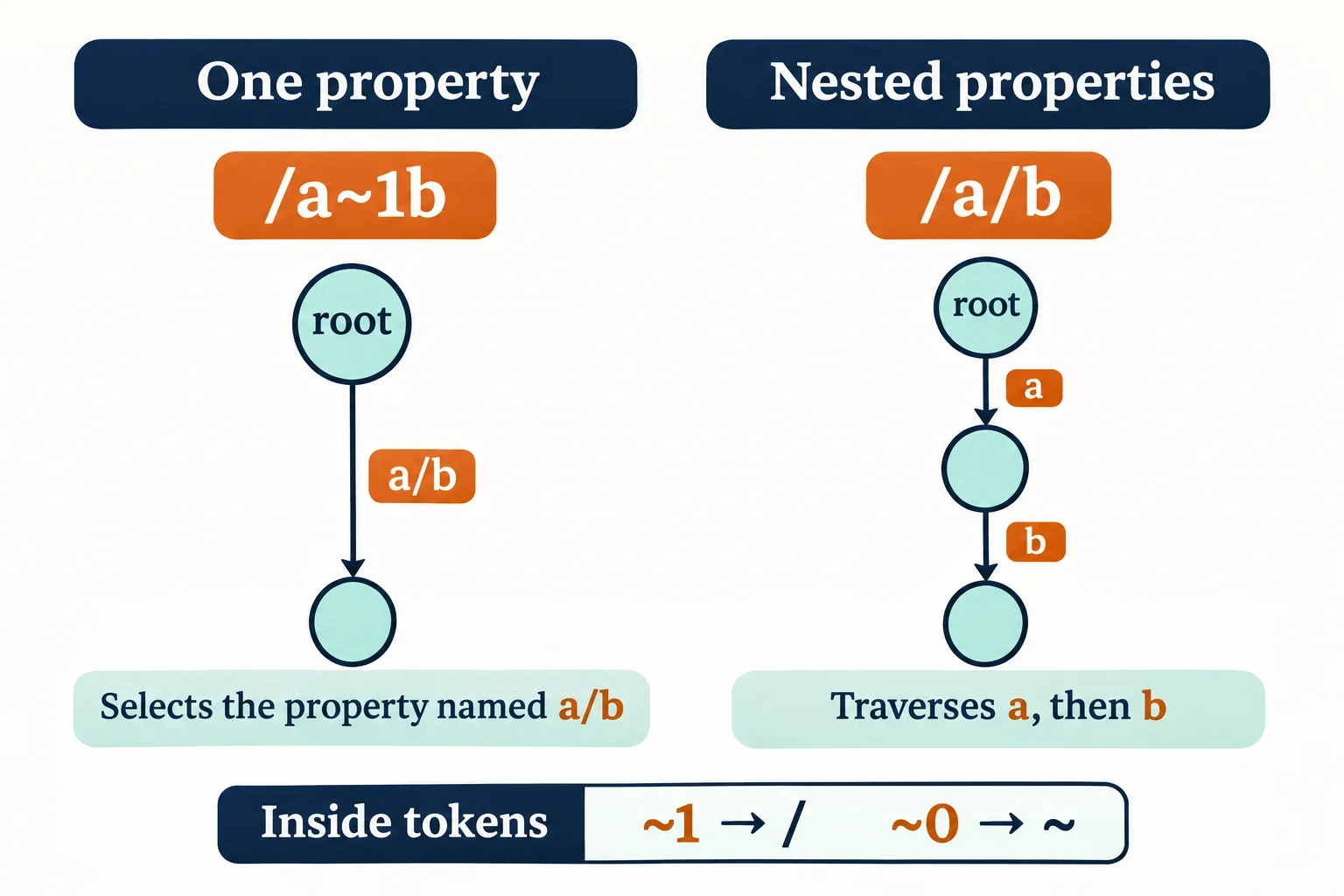
In a JSON Pointer path, ~1 represents a literal slash inside a property name, and ~0 represents a literal tilde. To read the path correctly, split it at literal slash separators first. Then decode each token by replacing ~1 with / before replacing ~0 with ~.
That order matters when an API error names a field such as /items/0/a~1b/m~0n. The path can lead through an array to properties named a/b and m~n; the slash inside a/b does not introduce another lookup. Before tracing an error, confirm that the API documents its location as JSON Pointer and identify the JSON document to which that location applies.
What ~0 and ~1 represent
JSON Pointer is a string syntax for locating a particular value within a JSON document. Its reference tokens are introduced by literal slashes. The two escapes let a token contain characters that need special handling in the pointer syntax.
| Inside a reference token | Literal character in the property name |
|---|---|
~0 |
~ |
~1 |
/ |
Consider this constructed document:
{
  "a/b": "single property",
  "a": {
    "b": "nested property"
  },
  "m~n": "tilde property"
}
The pointers select different values:
| Pointer | Lookup | Expected value |
|---|---|---|
/a~1b |
One property named a/b |
"single property" |
/a/b |
Property a, then its property b |
"nested property" |
/m~0n |
One property named m~n |
"tilde property" |
The distinction is structural. Changing /a~1b to /a/b changes the sequence of lookups. When comparing an API error with your input, inspect the actual property names before interpreting every visible slash as part of a name or every escaped slash as another level.
Split the pointer before decoding its tokens
For a nonempty pointer, separate the tokens using the literal slash characters already present in the pointer. The initial slash introduces the first token. Within each resulting token, replace ~1 with /, then replace ~0 with ~.
For /a~1b/m~0n, the stages are:
| Stage | Result |
|---|---|
| Pointer | /a~1b/m~0n |
| Raw tokens | ["a~1b", "m~0n"] |
| Decoded tokens | ["a/b", "m~n"] |
Decoding the whole pointer before splitting would produce /a/b/m~n. Splitting that altered string would incorrectly create three tokens. The slash recovered from ~1 belongs inside the first property name.
Why ~01 becomes ~1
The pointer /~01 contains one raw token: ~01. During the first replacement, there is no ~1 sequence to change. During the second replacement, ~0 becomes ~, leaving the literal token ~1.
That is the finished result. Do not send the result through the decoder again. A second pass would change ~1 to / and select a different property name.
Reversing the replacement order creates the same problem within one decoding operation: replacing ~0 first exposes a new ~1, which the next replacement would incorrectly turn into a slash. Use the prescribed order once per token, rather than repeating replacements until the text stops changing.
Trace an API error to an escaped field
Suppose an API reports /items/0/a~1b/m~0n as an error location. Once you have confirmed which document the pointer references, decode the tokens before attempting the lookup.
This runnable JavaScript demonstrates decoding a nonempty pointer:
const p = '/items/0/a~1b/m~0n';
console.log(p.slice(1).split('/').map(s => s.replace(/~1/g, '/').replace(/~0/g, '~')));
Expected token values, expressed as JSON:
["items", "0", "a/b", "m~n"]
This is a decoding demonstration without input validation. It does not establish that an arbitrary input is a valid pointer or that its tokens resolve successfully.
Use this constructed document to follow the decoded tokens:
{"items":[{"a/b":{"m~n":"bad"}}]}
The lookup proceeds as follows:
- On the root object,
itemsselects the array. - On that array,
0selects its first element. - On the selected object,
a/bselects the property containing another object. - On that object,
m~nselects the string"bad".
The corresponding direct JavaScript access is:
const doc = {"items":[{"a/b":{"m~n":"bad"}}]};
console.log(doc.items[0]['a/b']['m~n']);
Expected output:
bad
This trace locates the value named by the error. To understand why the API rejected that value, read the error message alongside the API’s requirements for the field.
Read each token against the current value
A token’s meaning depends on the value you have reached. Against an object, the decoded token names a member. Against an array, an index token selects an element by its zero-based position. The token text alone does not tell you which operation applies.
Consider:
{
  "": "empty-name value",
  "0": "object property",
  "items": ["first", "second"]
}
| Pointer | Interpretation | Expected value |
|---|---|---|
| Empty string | Select the whole document | The complete object above |
/ |
Select the root member with an empty name | "empty-name value" |
/0 |
Select the object member named 0 |
"object property" |
/items/0 |
Select array element zero | "first" |
/items/1 |
Select array element one | "second" |
The empty pointer and / therefore have different meanings. The empty pointer contains no reference tokens. The pointer / contains one token whose name is the empty string.
Preserve empty tokens when splitting. Filtering them out would erase a meaningful lookup. For example, //x contains an empty first token followed by x; against an appropriate document, it selects the root’s empty-name member and then that value’s x member.
Also resist converting every numeric-looking token into a number before inspecting its container. An object property named 0 remains a property name, even though the same token can select the first element of an array.
Find the first token that fails
A useful troubleshooting trace records four things at each step: the current value, the raw token, the decoded token, and the lookup result. Stop at the first token that cannot resolve to a concrete value. Later tokens cannot explain a lookup that has already failed.
Using the earlier document, change the pointer to /items/0/a~1b/m~0missing:
| Current value | Raw token | Decoded token | Lookup result |
|---|---|---|---|
| Root object | items |
items |
Array containing the item |
| Items array | 0 |
0 |
First item object |
| First item object | a~1b |
a/b |
Object containing m~n |
Object containing m~n |
m~0missing |
m~missing |
Missing property; evaluation fails |
This identifies the mismatch precisely: traversal reached the intended parent object, but the final member name was absent.
Checks that explain common failures
- Missing member: Compare the decoded name with the members of the current object. Also confirm that you are tracing the document referenced by the API.
- Unrecognized tilde sequence: A sequence such as
~2, or a trailing~, is not one of the two escape forms shown here. Flag it during syntax validation. The replacement-only demonstration does not perform that check. - Leading zero in an array index: Array indexes cannot contain leading zeros. Use
0for zero;01cannot select array element one. Against an object,01can instead be a member name. - Array token
-: Against an array, this refers to a nonexistent element and cannot resolve an existing value.
Two further issues can make a name lookup fail. If the referenced name occurs more than once in its object, the referenced member is undefined and evaluation fails. Member matching also performs no Unicode normalization. Check the actual names and, where duplicates are suspected, inspect the original input and how your tools report duplicate members.
Keep JSON strings and URI fragments separate
The pointer value and the representation carrying that value are separate layers. Identify the representation before deciding which decoding steps to apply.
A pointer carried in a JSON string
When an API response contains a pointer as a JSON string, JSON string backslash escapes must be processed before the resulting string is interpreted as a pointer. Inspect the string value produced by JSON parsing, then split and decode its pointer tokens.
Do not treat the spelling visible in raw JSON response text as necessarily identical to the resulting string. Conversely, if your code already holds the parsed string value, avoid applying another round of JSON string unescaping simply because you are about to process a pointer.
A pointer carried in a URI fragment
The URI fragment representation adds UTF-8 encoding and percent-encoding for characters disallowed by the fragment rule. When the application documents a fragment as JSON Pointer, reverse that representation layer to obtain the pointer, then perform token splitting and tilde decoding.
The percent character illustrates why the context matters:
| Representation | Resulting lookup |
|---|---|
Plain pointer /c%d |
Member named c%d |
Plain pointer /c%25d |
Member named c%25d |
Documented JSON Pointer fragment #/c%25d |
Member named c%d after fragment decoding |
A percent sequence inside an ordinary pointer does not, by itself, request percent decoding. Applying URI decoding to every pointer would change the member name in the second row.
Before interpreting a fragment this way, check the API’s documentation or the relevant media type’s fragment definition. application/json does not itself define JSON Pointer as its fragment identifier syntax. A JSON document and a fragment are therefore insufficient, on their own, to establish the intended interpretation.
Build a pointer from literal property names
To construct a pointer, work in the opposite direction: encode each literal property name before joining the tokens with slash separators. Within a name, replace ~ with ~0 first, then replace / with ~1.
This runnable JavaScript encodes the single property name a~/b:
const key = 'a~/b';
console.log('/' + key.replace(/~/g, '~0').replace(/\//g, '~1'));
Expected output:
/a~0~1b
The result has one token. Decoding that token recovers the original name a~/b.
Encoding order matters because the escape introduced for a slash contains a tilde. Replacing slashes first and then encoding every tilde would also alter the newly introduced escape. Encode the original tildes before introducing ~1.
For several tokens, encode them individually and then join them:
const tokens = ['items', '0', 'a/b', 'm~n'];
const pointer = '/' + tokens.map(token =>
  token.replace(/~/g, '~0').replace(/\//g, '~1')
).join('/');
console.log(pointer);
Expected output:
/items/0/a~1b/m~0n
Do not join unescaped names first and then encode the entire path: that would encode the separators along with slashes belonging to names. Preserve empty names as tokens, and handle a path with no tokens as the empty pointer.
When diagnosing an API error, compare the decoded token sequence with the intended sequence of property names and array positions. That comparison reveals whether the mismatch lies in pointer construction, representation decoding, or a particular lookup.