On this page
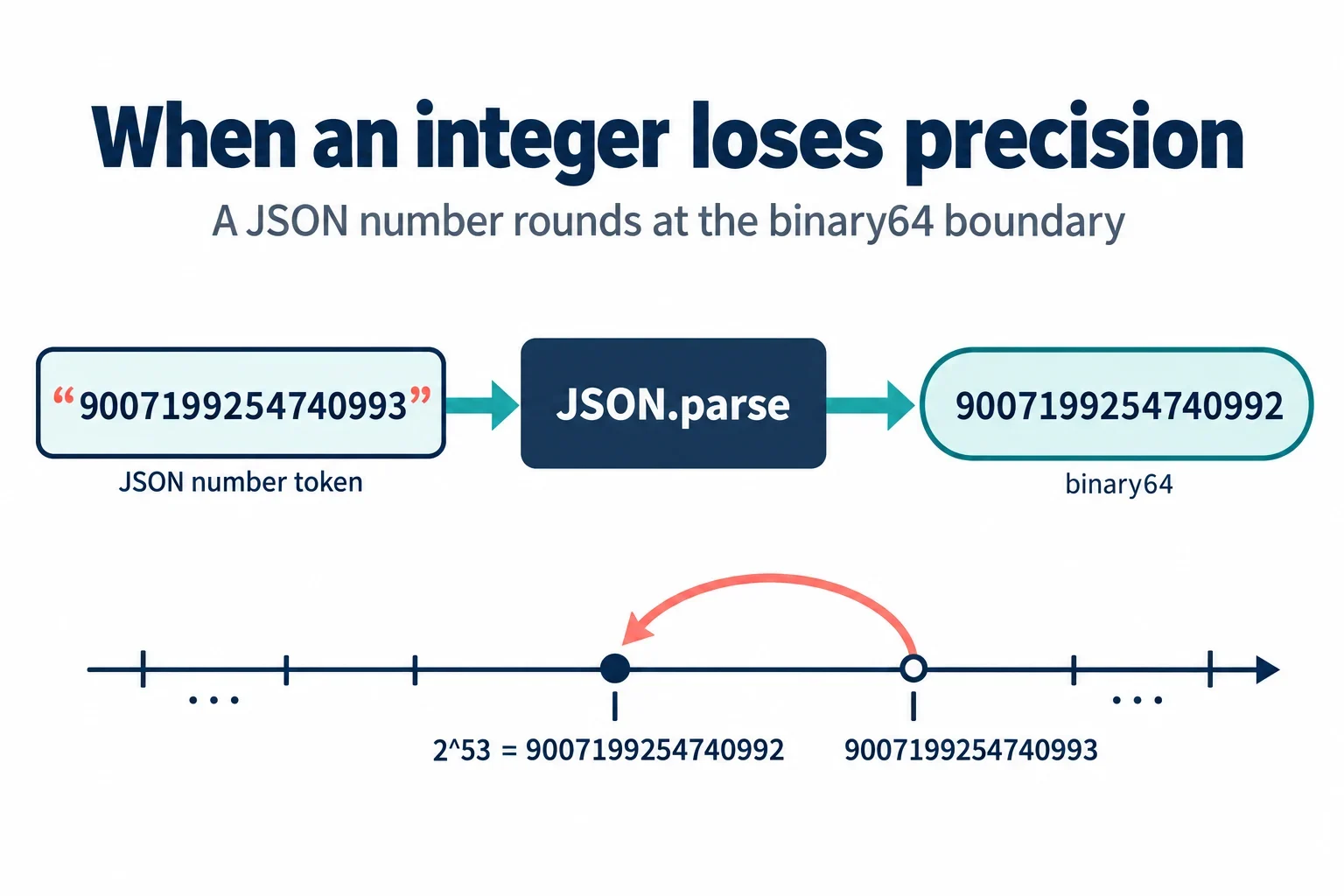
Here is the reproduction in two lines:
JSON.parse('{"id":9007199254740993}').id; // 9007199254740992
The JSON text is valid. The consumer’s binary64 representation is not exact. That distinction matters because it changes where you debug: not in the JSON grammar, but in the program that converts the number token to a Number, the serializer that writes it back, or the API contract that promised a 64-bit integer to a JavaScript client.
This article walks those three failure points separately: parsing, transforming and reserializing, and contract design. It then gives concrete fixes: string-encoded identifiers, BigInt with an explicit serializer, token-preserving inspection, and a boundary test set checked at every hop. The rule stays the same: inspect data, find the mismatch, use explicit ranges, and do not hide the loss behind a silent fix.
Why 9007199254740993 Becomes 9007199254740992
Binary64 has a 53-bit significand. The safe-integer ceiling in JavaScript is 2^53 - 1, or 9007199254740991. At 2^53 the spacing between representable numbers becomes 2, so 2^53 + 1 has no exact binary64 representation.
In a JavaScript console, the boundary looks like this:
Number.MAX_SAFE_INTEGER; // 9007199254740991
Number.isSafeInteger(9007199254740991); // true
Number.isSafeInteger(9007199254740992); // false
Number.isSafeInteger(9007199254740993); // false
9007199254740993 === 9007199254740992; // true
The last line surprises people. The literal 9007199254740993 is already rounded before the comparison runs, so both literals evaluate to the same Number. At exactly halfway between 2^53 and 2^53 + 2, round-to-nearest-even selects the even significand, which is 9007199254740992.
That is the collapse: 9007199254740993 enters as text and emerges as 9007199254740992. The JSON document did not become malformed. The value became unrepresentable in the consumer’s numeric type.
The JSON Grammar Is Not the Problem
RFC 8259 defines a number grammar that does not impose a 53-bit cap. An integer token can contain many digits. The document below is syntactically valid JSON:
{"id":9007199254740993}
A parser can accept that document and still return a rounded Number. Syntax validation and precision validation answer different questions. A syntax checker asks whether the token matches the grammar. A precision checker asks whether the consumer can represent the value exactly.
The interoperable range where implementations are expected to agree is [-(2^53)+1, (2^53)-1]. Outside that range, implementations may accept the same token and produce different values, or reject it for their own implementation limits. That is why a schema that only says type: integer is not enough for an ID field. The grammar allows the token; the runtime may not preserve it.
So the first debugging step is to separate the two failure classes. If the payload fails to parse, inspect the grammar and the error location. If it parses but the value changes, inspect the number token and the consumer’s numeric representation.
What JSON.parse Actually Returns
By default, JSON.parse converts JSON number tokens to JavaScript Number values. That means the original digits are no longer available to application code after the parse.
const text = '{"id":9007199254740993}';
const value = JSON.parse(text);

typeof value.id; // "number"
value.id; // 9007199254740992
String(value.id); // "9007199254740992"
The reviver callback does not recover the original token. It receives the already-parsed Number, so converting that value to BigInt preserves the rounded result, not the source digits:
JSON.parse(text, (key, value) =>
  typeof value === 'number' ? BigInt(value) : value
).id; // 9007199254740992n
That is a useful trap to recognize in code review. A reviver that calls BigInt(value) looks exact, but it is exact only about the rounded value. If you need the original token, use a parser that preserves number lexemes, or change the contract so the value arrives as a string or is handled with an explicit big-integer parser.
BigInt: Exact Arithmetic, Awkward Serialization
BigInt holds integers exactly, but it is not a drop-in replacement for Number at the JSON boundary.
const id = 9007199254740993n;
id; // 9007199254740993n
id.toString(); // "9007199254740993"

JSON.stringify({ id });
// TypeError: Do not know how to serialize a BigInt
The error is deliberate. JSON.stringify has no default representation for BigInt. You must choose one explicitly. A replacer can emit the value as a string:
const payload = { id: 9007199254740993n };
const json = JSON.stringify(payload, (key, value) =>
  typeof value === 'bigint' ? value.toString() : value
);

console.log(json);
// {"id":"9007199254740993"}
That output is safe only if the consumer expects a string. If the consumer expects a JSON number, you need a serializer that can emit the digits verbatim, and you need the downstream parser to preserve them. Do not convert the BigInt back to Number to make the error go away. That reintroduces the rounding at the last possible moment, where it is hardest to see.
String-Based IDs as the Interoperable Default
The practical default for ID-like fields is a string. Identifiers, account numbers, order codes, and platform IDs are labels, not quantities. You do not add two user IDs together. You compare them, route them, and store them. A string preserves every digit and every leading zero.
const payload = JSON.parse('{"id":"9007199254740993"}');
payload.id; // "9007199254740993"
This also avoids a second trap: JSON numbers cannot have leading zeros. If an account code is 000123, the number form is invalid JSON and the string form is the only clean representation. The same reasoning applies to large platform identifiers. Twitter/X snowflake IDs are a common example: if a client parses them as JSON numbers, it can silently receive a different value.
Quantities are different. If a field really is a numeric quantity, define an explicit contract: a decimal string with a stated scale, a big-integer string, or a BigInt field with a serializer that both sides understand. The line is not about size alone. It is about whether the value is an identifier or a number you intend to compute with.
Serializer and Round-Trip Settings
Precision can be lost at any hop: parse, transform, store, reserialize. A value that was exact in the database can be rounded by the driver, then rounded again by JSON.stringify.
const original = '{"id":9007199254740993}';
const parsed = JSON.parse(original);
console.log(JSON.stringify(parsed));
// {"id":9007199254740992}
The serializer emits the already-rounded double. It has no memory of the original token. Three serializer choices reduce the risk:
- Emit ID-like values as strings. This is the most interoperable default and makes the contract visible in the payload.
- Emit digits verbatim when a numeric token is required. Use a serializer with an explicit raw-number or big-integer mode, not a generic
Numberconversion. - Avoid exponent notation for ID fields.
1e+21is valid JSON, but it obscures the exact digits and breaks naive consumers that expect an integer token. Keep ID fields in plain digit form, or keep them as strings.
Also inspect the database and driver boundary. A 64-bit integer column read into a 64-bit integer type is exact. The same column read into a double is not. Configure the driver to return a string or a BigInt when the contract requires exact digits. Then check the value again after every transform and after reserialization. A single JSON.parse or JSON.stringify call is enough to change the value.
Validating Large Numeric IDs in APIs
Start by documenting the accepted range. If an API accepts JSON numbers for an ID field, the safe interoperable range is -9007199254740991 to 9007199254740991. If the API needs values beyond that, the contract should use strings or an explicit big-integer representation. A schema that advertises int64 is a promise to verify end to end, not a guarantee that a JavaScript client can represent the value.
Use boundary vectors in tests and code review. The three values below expose the edge:
const vectors = ['9007199254740991', '9007199254740992', '9007199254740993'];
for (const token of vectors) {
  const doc = `{"id":${token}}`;
  const parsed = JSON.parse(doc);
  const out = JSON.stringify(parsed);
  console.log(`${token} -> ${parsed.id} -> ${out}`);
}
Expected output:
9007199254740991 -> 9007199254740991 -> {"id":9007199254740991}
9007199254740992 -> 9007199254740992 -> {"id":9007199254740992}
9007199254740993 -> 9007199254740992 -> {"id":9007199254740992}
Run those vectors through every hop: parse, transform, store, reserialize. If the contract allows only safe integers, reject out-of-range tokens before they become Number values, or use a token-preserving parser. Checking after JSON.parse is too late because the digits are already gone.
If your linter emits a warning such as W050 for unsafe integer literals or numeric IDs, read the rule and fix the contract rather than suppressing it. JSON Schema type: integer and OpenAPI format: int64 describe intent; they do not make a JavaScript runtime exact. Validate the actual token and the actual consumer.
Inspecting a Suspicious Payload Locally
A local inspector is useful precisely because it can show the token before an application parser turns it into a Number. In escentmachine’s JSON Inspector, paste the raw payload and inspect the number lexemes rather than only the tree preview.
{"id":9007199254740993,"name":"sample"}
The document is syntactically valid, so a grammar-only check should not report a syntax error. The inspector should flag the id value as outside the safe integer range and preserve the token 9007199254740993 for inspection. If a tree preview renders 9007199254740992, that is the consumer’s Number, not the source text. That difference is the mismatch you are looking for.
Duplicate keys deserve the same treatment. A payload like this is ambiguous:
{"id":9007199254740993,"id":9007199254740992}
Different parsers may keep the first value, keep the last value, or reject the document. A good inspector flags or rejects duplicate keys rather than silently choosing one. If the payload is malformed, the error panel should point to the location so you can fix the grammar before investigating precision.
For a before/after pair, use the compare view to align the id path and compare the token at that path. Do not compare the rounded tree values. The useful comparison is 9007199254740993 versus 9007199254740992, plus the hop where the change occurred.
The workflow stays local in the browser: no model call, no user code execution, no eval-based JSON parsing. Inspect the data, find the mismatch, and then choose the explicit fix: string ID, BigInt with a serializer, or a documented numeric range with boundary tests.