On this page
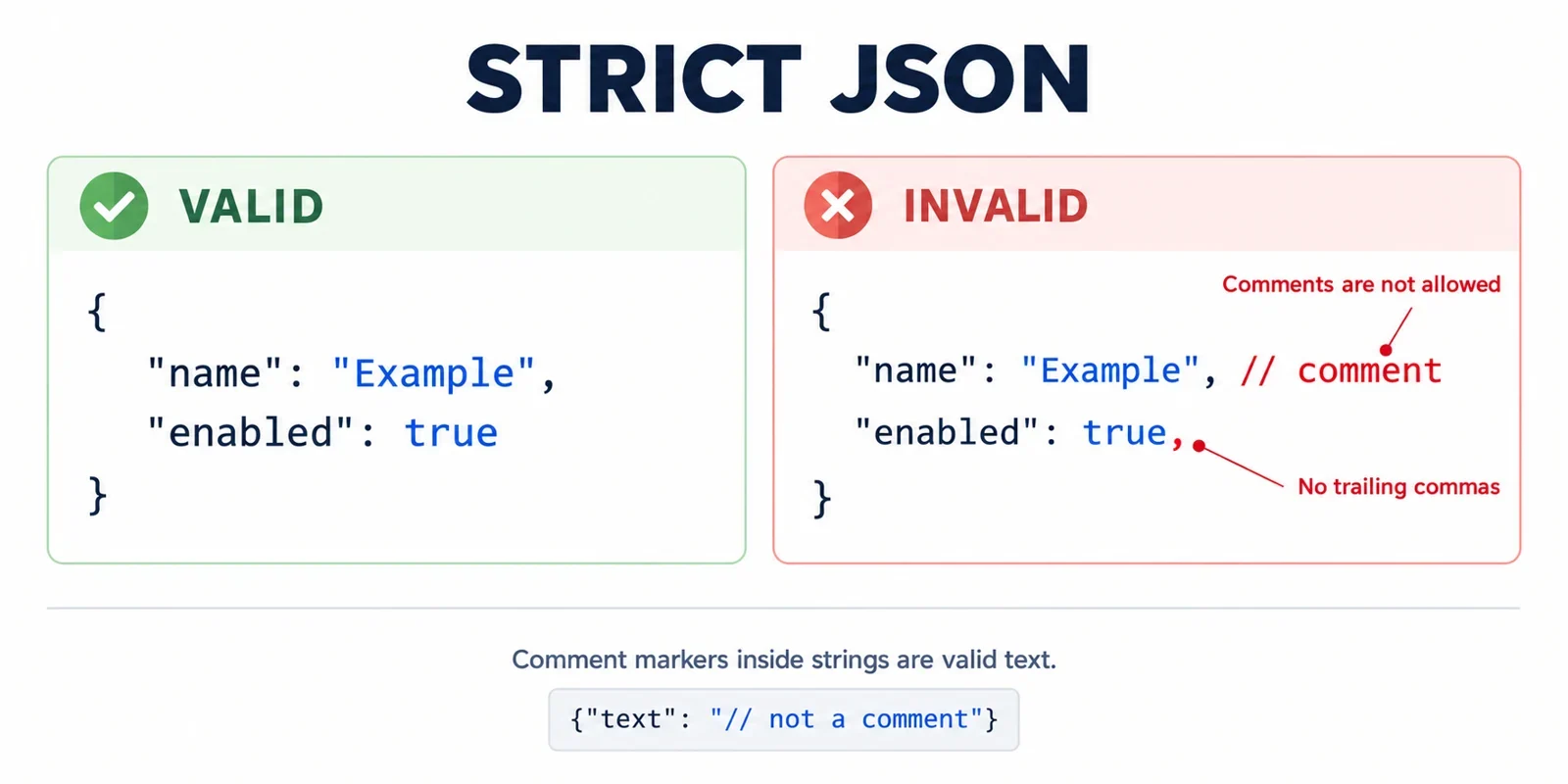
Strict JSON rejects comments because its grammar does not recognize them. It rejects trailing commas because a comma separates one member or value from the next: a closing bracket or brace cannot supply the missing item. These are syntax rules, so changing indentation cannot resolve either problem.
The practical solution is to identify the input format, remove only the unsupported syntax that its rules permit, and validate the result. That requires recognizing strings and escapes before interpreting apparent comment markers or commas. The examples below are proposed inputs with expected results, not reports of executed tests.
Why strict JSON rejects comments
Strict JSON has no comment production: there is no grammatical rule that tells a strict consumer to accept an annotation beginning with // or /*. A comment therefore changes the accepted syntax rather than merely changing its presentation.
JSON recognizes four whitespace characters: space, horizontal tab, line feed, and carriage return. At a position where whitespace is permitted, those characters can provide spacing. Comment markers do not become whitespace simply because a reader understands them as explanatory notes.
Consider this proposed input in a dialect that permits comments:
{"enabled": /* explanation */ true}
A corresponding strict JSON representation would be:
{"enabled": true}
The conversion removes the annotation and leaves whitespace between the surrounding tokens. It does not ask the strict consumer to interpret the annotation.
Why is a comment different from an extra space?
The distinction comes from the grammar, not from how much information the text carries. A space is recognized whitespace; a comment is unsupported syntax. Even a short, harmless annotation remains outside strict JSON when it appears outside a string.
Before cleaning an input, establish whether comments are permitted by its declared source dialect. Otherwise, a converter risks treating arbitrary malformed text as something it has permission to discard.
Why a trailing comma leaves something missing
In a JSON object, a comma separates members and must be followed by another member. In an array, it separates values and must be followed by another value. A trailing comma leaves that requirement unfulfilled.
For an array, compare these proposed calls:
JSON.parse('[1,2,]')
Expected outcome: a SyntaxError, because the final comma requires another value before the closing bracket.
JSON.parse('[1,2]')
Expected outcome: a two-element array containing 1 and 2. These outcomes are illustrative expectations; no particular error-message wording is assumed.
The same reasoning applies to an object:
{"count":2,}
The comma after 2 requires another member. Removing that trailing separator produces:
{"count":2}
Does the comma mean “this item is finished”?
That interpretation is the source of the mismatch. In strict JSON, the comma connects an item to a following item; it does not terminate a collection. The closing delimiter finishes the object or array without an extra comma.
This also explains why deleting a trailing comma is different from supplying missing data. A controlled conversion may remove an allowed source-dialect separator. It should not invent a member or value to satisfy an otherwise incomplete input.
Why configuration files can follow different rules
Acceptance depends on the consumer and its input contract. JavaScript object and array literals permit trailing commas. That does not make the same text valid strict JSON.
JSONC configurations and configurable parsing introduce another practical distinction: comment handling and trailing-comma handling are separate questions. Permission for one feature does not establish permission for the other. When working with System.Text.Json, verify the effective parser settings for each feature instead of assuming that a successful configuration load establishes strict JSON compatibility.
| Context | What to establish | Practical consequence |
|---|---|---|
| Strict JSON | Comments and trailing commas are rejected | Both must be absent from the submitted text |
| JavaScript object or array literal | Trailing commas are permitted | The literal still needs review before use as strict JSON |
| JSONC configuration | The consumer’s rules for comments and trailing commas | Check the two features independently |
| System.Text.Json | The settings used by the actual parsing operation | Confirm behavior at the point where the text is consumed |
My editor accepts it. Why does another consumer reject it?
An editor or configuration loader answers a question about its own accepted input. A strict JSON consumer answers a different question about the JSON grammar. Acceptance by the first does not establish acceptance by the second.
Record the intended source dialect before conversion and the required output format afterward. This gives each edit a clear justification and avoids an undefined promise to accept anything that looks close to JSON.
Comment-like text inside strings must survive
A converter must distinguish syntax outside strings from characters belonging to string contents. Otherwise, an apparent cleanup can change the data it was supposed to preserve.
Use an example like this when reviewing the proposed behavior:
{
  "url": "https://example.test/a",
  "marker": "/* keep */",
  "ending": ",}",
  "message": "She said \"keep // this\"."
}
The expected result is unchanged text. The URL contains //, the marker contains /* keep */, and another value contains ,}. None of those appearances authorizes a deletion because they occur inside strings.
The message adds an escape-related check. Its escaped quotation marks must remain within the string; they must not be mistaken for the end of that string. A scan that simply searches for the next quotation mark does not provide the required distinction.
What should preservation mean here?
For syntax-only cleanup, compare the complete original and resulting string tokens, including their quotation marks and escape sequences. Preserving only an interpreted value is a different requirement and does not demonstrate that the original text survived unchanged.
Broad replacements targeting everything after //, everything between apparent block-comment markers, or every ,} sequence fail to establish whether those characters are syntax. Recognize their context first.
Remove unsupported syntax with token awareness
Design the converter around an explicitly declared source dialect. Specify which comment forms and trailing separators it may remove, then reject inputs outside that contract. A useful conversion procedure has several distinct responsibilities:
- Track strings and escapes. Copy string tokens unchanged. Interpret apparent comment markers and structural punctuation only in the appropriate state outside strings.
- Track comment boundaries. Recognize comments according to the declared dialect. Stop if a comment requiring a closing boundary never receives one.
- Replace comments with whitespace. Retain line breaks rather than joining the surrounding text directly.
- Track grammatical context. Determine whether a comma follows a completed member or value and whether the next significant token closes the corresponding collection.
- Preserve other tokens. Copy number tokens and all unaffected text without evaluating or reformatting their values.
- Validate the result. Submit the complete converted text to a strict JSON parser.
Why leave whitespace behind?
Consider the deliberately malformed fragment 1/* note */2. Deleting the comment without a replacement would create 12, silently turning separate tokens into a different number. Replacing the comment with a space leaves 1 2, allowing validation to expose the unresolved syntax problem.
How much context does a trailing comma need?
Finding a comma before a closing delimiter is insufficient. The preceding member or value must be complete, and the surrounding structure must permit that one separator under the source dialect. For example, [1,,] contains repeated separators and should stop conversion. Repeatedly deleting commas until the text parses would hide the missing value.
Use a scanner and grammatical checks appropriate to the declared input. Avoid eval and broad text replacements: neither is the controlled syntax conversion described here.
A minimal conversion with expected output
The following input belongs to a permissive dialect that allows the shown comment and trailing separators. It is not strict JSON:
{"url":"https://example.test/a",/*note*/"items":[1,2,],"text":",}",}
For a converter explicitly supporting those features, the expected output is:
{"url":"https://example.test/a", "items":[1,2],"text":",}"}
The intended edit replaces /*note*/ with one space, removes the trailing separator from the items array, and removes the final trailing separator from the object. The other commas remain because they still separate members or values.
Check every string token
All five string tokens should remain identical, in the same order:
| Role | Tokens to preserve exactly |
|---|---|
| Member names | "url", "items", "text" |
| URL value | "https://example.test/a" |
| Text value | ",}" |
The // within the URL must survive, as must the comma and brace within the final string. The number tokens 1 and 2 should also remain unchanged.
This example defines an expected transformation, not evidence that an implementation has passed it. Review both parts of the result: strict syntax and preserved data. A valid output alone would not reveal whether an overly broad replacement had damaged a string.
Validate the result without guessing missing data
Conversion should stop when resolving an input would require inventing content. Removing a declared source-dialect feature is a bounded operation; choosing an absent value or reconstructing an unfinished string is not.
Include negative cases alongside the successful example:
| Proposed input | Problem | Expected handling |
|---|---|---|
[1,,2] |
Repeated separators leave a value missing | Reject |
[,2] |
The first array value is missing | Reject |
[1,,] |
Repeated separators cannot be treated as one trailing comma | Reject |
{"item":,} |
The member has no value | Reject |
{"item":1,/* unfinished |
A block comment is unterminated | Reject |
{"text":"unfinished} |
A string is unterminated | Reject |
Do not insert a guessed value, add a quotation mark, or repeatedly remove punctuation to make these cases pass. Preserve a clear distinction between supported conversion and malformed input.
Check syntax and preservation separately
After conversion, validate the entire output as strict JSON. Then compare the original and resulting string and number tokens, excluding only the comments and trailing separators intentionally removed. These checks answer different questions: whether the output is accepted and whether the conversion preserved its data.
For a native parse-and-reserialize workflow, verify numeric precision separately before adopting it as a cleanup method. If parsing has rounded a numeric value, serializing that value cannot reconstruct the original number token. A syntax-only converter can instead copy the original numeric text while making its narrowly defined edits.
If the input contract does not establish whether a particular number survives native parsing accurately, ask for that requirement and verify it. Do not assume that a successful parse proves numeric fidelity.
A useful completion report should identify the unsupported syntax removed, confirm strict validation, and state whether token preservation was checked. That makes the transformation reviewable without treating successful parsing as proof of every other property.