On this page
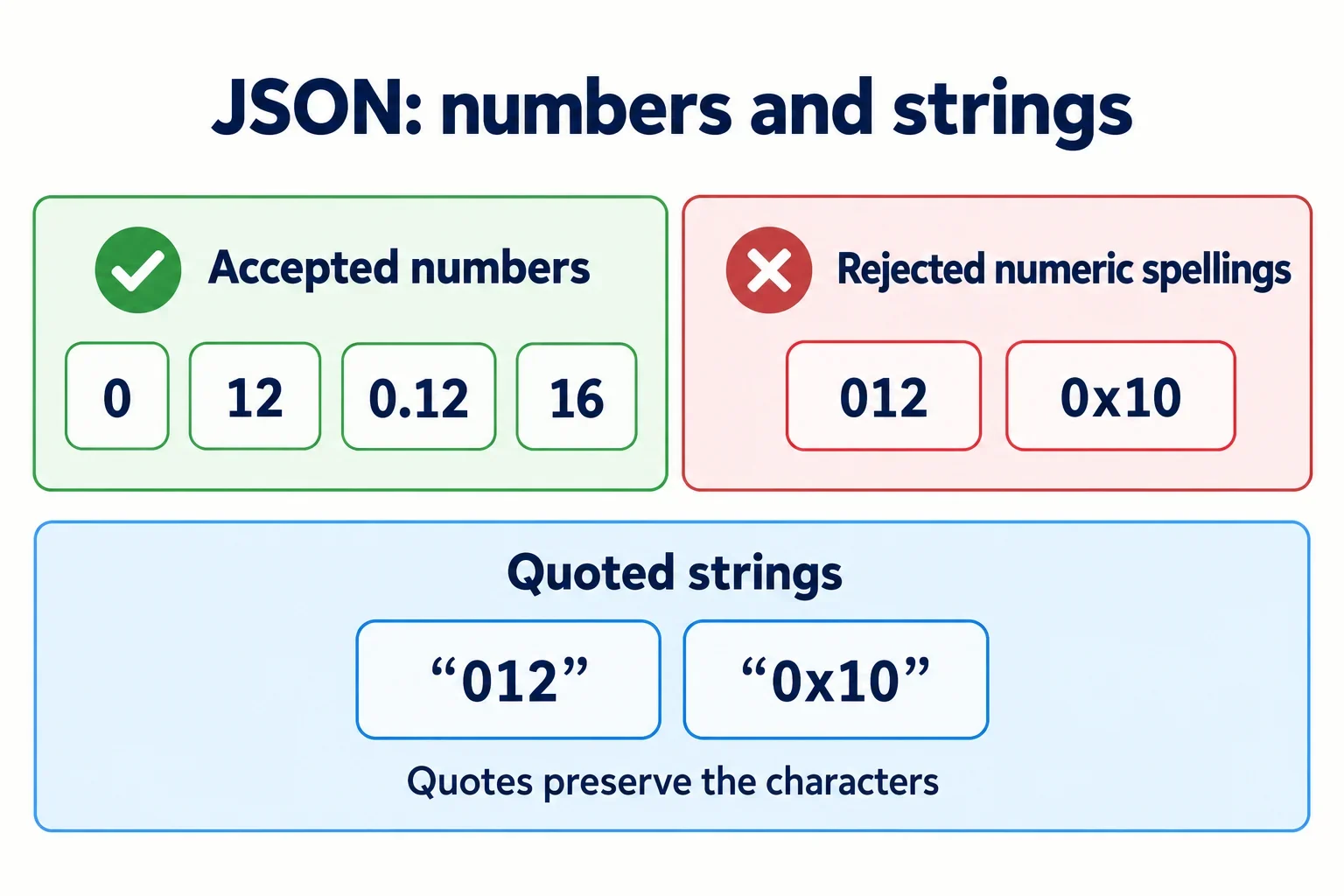
JSON rejects 012 because its integer component cannot start with zero and continue with more digits. It rejects 0x10 because hexadecimal notation is not a permitted JSON number form. When the intended quantities are twelve and sixteen, use 12 and 16. When the characters themselves matter, use strings such as "012" and "0x10".
A number’s value and its permitted spelling are separate concerns. Understanding what a token might represent does not establish that its spelling follows JSON’s grammar. Likewise, correcting the spelling requires knowing what the field was intended to contain.
Start with the syntax rule, then check the meaning of the data. The examples below show valid and invalid inputs, explain their expected grammar status, and help you correct the producer while preserving quantities, identifiers, or written notation as required.
How JSON defines a number
A JSON number has an integer component, which may be preceded by a minus sign. It may also include a fractional component and an exponent. Each component has its own requirements, so the position of a digit matters when checking a token.
The integer component permits either:
- A single
0. - A digit from
1through9, followed by zero or more digits.
This allows 0, 7, 12, and 120. In the last example, the zero follows a permitted nonzero first digit. The restriction concerns how the integer begins; it does not prohibit zeros throughout an integer.
A fraction consists of a decimal point followed by at least one digit. In 0.12, the integer component is 0, and the fractional digits are 12. In 12.0, the integer component is 12, and the fractional digit is 0. Both follow the relevant component rules.
The exponent has a digit sequence containing one or more digits. That sequence does not have the integer component’s requirement to begin with a nonzero digit. This distinction matters for examples such as 1e02.
JSON has its own permitted spellings
Even when the surrounding programming language accepts additional numeric forms, the text produced as JSON must follow JSON’s grammar. Inspect the emitted text separately from the code that constructed the value.
Portability is a documented JSON design goal. A shared grammar gives producers and consumers a common set of permitted forms. When exchanging data, conforming output provides a clearer basis for compatibility than acceptance by one particular implementation.
Why 012 fails while 0 and 0.12 work
In 012, the integer component begins with zero and continues with additional digits. That fits neither permitted integer pattern: it is longer than a single zero, and it does not begin with a digit from 1 through 9.
An optional minus sign does not change the integer rule. The token -012 still contains the invalid integer component 012. By comparison, -0 contains a permitted minus sign followed by the valid single-zero integer component.
| Token | Valid JSON number? | Explanation |
|---|---|---|
012 |
No | A zero cannot begin a multi-digit integer component. |
-012 |
No | The minus sign leaves the invalid integer component unchanged. |
0 |
Yes | The integer component is a single zero. |
-0 |
Yes | An optional minus sign precedes a single zero. |
12 |
Yes | The integer begins with a digit from 1 through 9. |
120 |
Yes | Digits after the first nonzero digit may include zero. |
0.12 |
Yes | The integer is 0, followed by a permitted fraction. |
0.012 |
Yes | The fractional digits may begin with zero. |
1e02 |
Yes | The exponent digits may begin with zero. |
Which component contains the zero?
In 0.012, the digits 012 occur after the decimal point. They belong to the fraction, whose requirement is a decimal point followed by at least one digit. The integer component remains the single permitted zero.
In 1e02, the integer component is 1, and 02 is the exponent’s digit sequence. The integer’s nonzero-first-digit restriction does not apply to that exponent sequence.
When diagnosing an error, identify the component before changing any characters. A document-wide instruction to remove zeros would overlook both valid numeric positions and strings whose characters need to remain intact.
Representing a hexadecimal value in decimal
JSON’s number grammar does not include a hexadecimal numeric form. Consequently, the unquoted token 0x10 is invalid wherever a JSON number is required. Recognizing that notation in another context does not make it a permitted JSON spelling.
When the intended input is hexadecimal 10, calculate its value as 1 × 16 + 0, which is sixteen. That established quantity can be written as a decimal JSON number:
{"value":16}
The conversion changes the notation while retaining the intended numeric value. Make this choice after confirming how the input was meant to be interpreted. A rejected token alone is not a complete description of the field’s purpose.
When the requirement is to preserve the original spelling, use a string:
{"notation":"0x10"}
This retains the characters 0x10. It gives the consumer a string containing the notation, so any later interpretation should follow an explicit agreement about the field.
| Intended requirement | Suitable JSON |
|---|---|
| Supply the numeric quantity sixteen | {"value":16} |
Retain the written notation 0x10 |
{"notation":"0x10"} |
Ask whether the receiving application needs a quantity for its work or the original text for display, storage, or comparison. If it needs both, establish separate fields and their meanings before producing the document.
Both examples above use permitted representations, but they preserve different things. The numeric field preserves the established quantity. The string field preserves the characters. Syntax validation can confirm the representation’s form; the intended use determines which representation to choose.
Preserving identifiers with leading zeros
A sequence of digits may identify something rather than express a quantity. If the exact characters matter, changing 012 to 12 discards the leading zero and the original three-character spelling.
Compare these valid documents:
{"quantity":12}
{"identifier":"012"}
The first supplies a number. The second supplies a string that retains the identifier’s characters. Choosing quotation marks therefore establishes a data type as well as resolving the invalid unquoted spelling.
Determine what the field means
Check the field’s documentation, the producer code, and the consumer’s expectations before editing the rejected token. Useful questions include:
- Is the field used as a quantity or as a label that selects a record?
- Does the consumer require an exact character sequence?
- Is padding or a fixed character count part of the agreed format?
- Must
"012"and"12"remain distinguishable?
A field name can guide the investigation, but it cannot establish the complete agreement by itself. For example, a name suggesting an identifier should prompt you to check character-preservation requirements rather than automatically choosing a conversion.
What conversion can discard
Once the original spelling has been replaced by the number 12, that number alone does not tell you whether the input was 12, 012, or another padded spelling. Reconstructing a particular identifier would require an additional formatting rule.
When the original characters are required, preserve them as a string while they are still available. If the field represents a quantity, confirm its numeric interpretation and use the corresponding valid number.
This separates two review questions: does the document follow JSON syntax, and does the chosen value still satisfy the field’s purpose? A correction is complete when both answers are clear.
Runnable checks and expected results
Copy the following documents into the JSON parser or inspector you are evaluating. Each row provides a complete input and its expected status under the supplied JSON grammar. These expectations describe syntax validity and intended content; they do not prescribe implementation-specific error messages or serialized output formatting.
| Input document | Expected grammar result |
|---|---|
{"n":012} |
Invalid: the integer component has a leading zero followed by digits. |
{"n":-012} |
Invalid: the minus sign does not correct the integer component. |
{"n":0x10} |
Invalid: hexadecimal numeric notation is unsupported. |
{"n":12} |
Valid: the field contains the number twelve. |
{"n":16} |
Valid: the field contains the number sixteen. |
{"id":"012"} |
Valid: the field contains a string preserving 012. |
{"notation":"0x10"} |
Valid: the field contains a string preserving 0x10. |
{"n":0.012} |
Valid: the zero inside the fraction is permitted. |
{"n":1e02} |
Valid: the exponent digits may start with zero. |
Review the meaning alongside the syntax
For a producer correction, record the expected field content before checking its output. If the requirement is an identifier with the characters 012, then {"id":12} does not meet that requirement even though its number spelling is valid. If the requirement is the numeric quantity sixteen, preserving "0x10" as a string selects a different representation that needs its own agreement.
The examples place fields inside objects. An older JSON grammar restricted a complete JSON text to an object or array, while a newer grammar defines a complete JSON text as a serialized value. Using object examples keeps that difference separate from the numeric spelling being examined.
If a tool accepts either invalid numeric example, check whether it permits extensions. Acceptance alone does not establish that the input conforms to JSON’s grammar.
Correct the producer using the intended data type
Trace the rejected token to the code that produces the JSON. Select the intended value and data type where the field’s meaning is known, then serialize that value into conforming text. Correcting a sample helps explain the issue; correcting the producer addresses subsequent output.
Use this sequence:
- Locate the field containing the invalid token and identify where its content originates.
- Establish whether the receiving application expects a quantity, an identifier, or preserved notation.
- Choose the corresponding value: for example, the number
12, the number16, the string"012", or the string"0x10". - Serialize the chosen data and inspect the resulting JSON against the grammar.
- Check that the receiving application gets the required quantity or exact characters.
For an identifier, the intended result could be {"identifier":"012"}. For an established hexadecimal quantity of sixteen, it could be {"value":16}. These are language-neutral output examples: use the appropriate serialization mechanism in the producer’s environment after making the type decision.
Check for permissive acceptance
The older specification permits parsers to accept non-JSON forms as extensions. It also requires a generator’s resulting text to conform strictly to JSON’s grammar. A permissive consumer can therefore accept a spelling that leaves the producer emitting invalid JSON. That can conceal a portability problem when another consumer receives the same text.
Keep repairs specific to the field
Broad text replacement can change unrelated string content. Replacing every occurrence of 012 with 12 could alter a valid identifier string. Replacing 0x10 with 16 throughout a document could change text that was intended to preserve notation.
Apply the correction where the field’s purpose is available, then verify the emitted syntax and the resulting data together. This makes the repair reviewable and gives future output an explicit representation to follow.