On this page
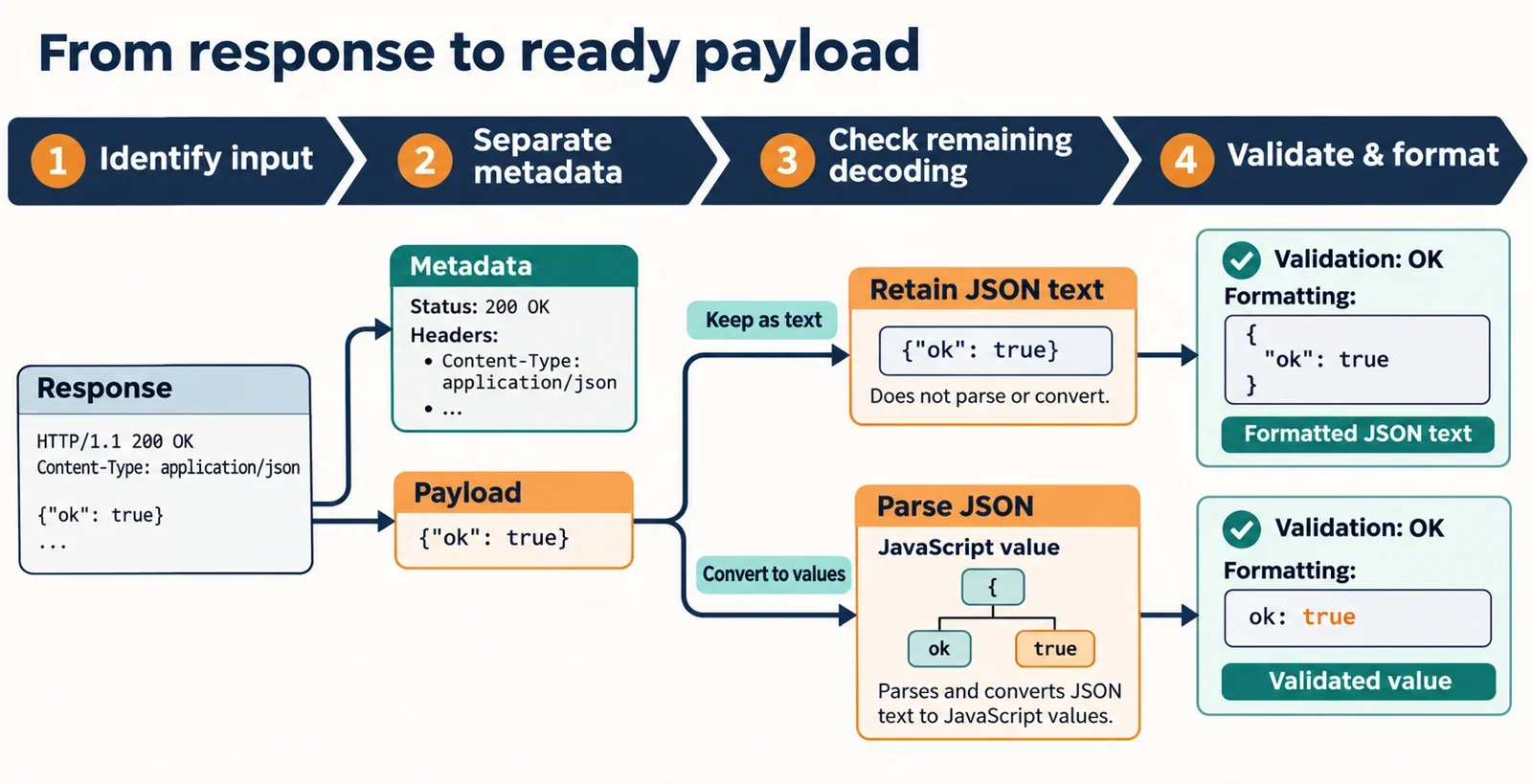
To extract and format JSON from an HTTP response with headers, first identify your input, isolate the intended body, establish whether any framing or content decoding remains, and then validate and format the payload. Choose the extraction step according to how the response was captured.
For a Fetch Response, the instance json() method reads the response stream and returns parsed JavaScript data. For a copied capture, first establish which text belongs to the body and what processing the capturing client has already performed. Keep the original input available locally so you can explain a mismatch without losing the evidence that produced it.
The examples below use a deliberately simple synthetic capture and a locally constructed Response. They provide explicit input and expected output while keeping protocol-specific extraction decisions tied to the documentation of your actual capture tool.
Identify what kind of response you have
Start with the origin of the input. A fulfilled fetch() promise provides a Response object representing the server’s response. That gives you a different starting point from text copied into an editor.
Before choosing a parser or formatter, record which of these inputs you have:
| Input | What to establish | Next action |
|---|---|---|
| Fetch Response object | Whether the body is available for the intended reading operation | Choose a body-reading path before consuming it |
| Header-inclusive text capture | Which portion the exporter identifies as the body | Select that body using the exporter’s documented layout |
| Raw message bytes | What processing the capture represents and what remains | Use documentation for that capture format before attempting JSON validation |
| Already-extracted body | Whether the text is the intended complete payload | Validate it and inspect the formatting result |
A useful question is: What exactly did the client export? Record the client, export option, and any processing settings that affect the result. A visual preview alone should not determine your extraction procedure.
Keep an untouched local copy when investigating a failure. Work on a separate copy, and remove sensitive values before sharing an example. This makes later comparisons easier without requiring a remote request.
Separate response headers from the payload
Give the JSON validator only the intended body. Keep status information, response headers, and capture annotations outside its input. The synthetic example at the end explicitly identifies its body so that this selection is reproducible.
For an unfamiliar capture, establish the boundary from the capturing tool’s documentation. Before recommending an automatic splitter, answer three practical questions:
- Does this export contain one response or several recorded exchanges?
- Which part does the exporter designate as the body for the response you want?
- Has the exporter inserted labels, separators, or display-only annotations?
If more than one block looks like response metadata, establish which response and body belong together before editing. Avoid treating the first convenient-looking separator as a verified extraction rule.
Likewise, searching for the first opening brace is an unsuitable general selection strategy: the parsed top-level value is not limited to an object. Choose the body according to the capture’s documented structure, then evaluate its contents.
Write down the extraction decision in plain language, such as “selected the body field identified by this export format.” That gives a colleague a concrete step to review and repeat.
Resolve transfer framing and content encoding
Keep transfer framing and content decoding as separate investigation items. For each, establish what the capturing client has already handled and what processing, if any, your next step requires.
A small preparation record can prevent guessing:
| Item | Record before proceeding |
|---|---|
| Transfer framing | The client’s documented handling and any remaining operation |
| Content decoding | The client’s documented handling and any remaining operation |
| Formatter input | The text you intend to submit as the JSON document |
Use “unknown” when the export does not establish an answer. Then check the relevant client or capture-format documentation before transforming the data. Avoid applying a decoding operation solely because a header or export label looks suggestive.
A body content-decoding failure is a documented cause of TypeError when reading a Fetch body. That makes decoding a relevant investigation when body reading fails; it does not identify the cause of every TypeError.
For captures that still require preparation, use a procedure documented for that specific representation. Keep its result separately so you can compare the prepared body with the original capture. The local example below begins with an explicitly prepared body.
Check status, content type, and body expectations
Treat status handling, access to the body, and JSON validation as separate decisions. An HTTP error status such as 404 does not by itself cause fetch() to reject its promise. A fulfilled request therefore still needs an application-level decision about whether its status and body are useful for your task.
Before parsing, ask what the endpoint is expected to return for the particular result you received. If the observed body is empty, record that observation and compare it with the endpoint’s documented expectations. Avoid inserting an empty object merely to obtain a successful formatting result.
Use available content-type information to guide inspection, then validate the actual intended body. If the body differs from the expected representation, preserve a short, redacted excerpt and investigate the response context before modifying the content.
Browser access can also determine what is available to inspect. An opaque response does not expose its headers or body to JavaScript. For a simple cross-origin request, an appropriate Access-Control-Allow-Origin response header is required before the browser shares the response with the caller.
When access is the obstacle, investigate that access condition first. Changing JSON indentation cannot resolve a body that JavaScript cannot read.
Choose the correct Fetch body-reading method
The instance json() method reads the response stream to completion and resolves to parsed JavaScript data. Choose it when the next step requires that parsed value.
Keep it distinct from the similarly named static method:
| Expression | Purpose |
|---|---|
| response.json() | Consume this response’s body and obtain parsed JavaScript data |
| Response.json(data) | Construct a Response containing the supplied JSON data |
The static method also sets the constructed response’s Content-Type header to application/json. It is useful for the local example because it supplies a response without a network dependency.
Decide whether you need the original text
If your priority is inspecting the exact body text, choose a capture or export path that provides that text and retain it before consuming a live body. Validate and format the retained copy locally.
Do not design the workflow around reading a body with json() and then simply reading the same body again. A locked or disturbed body is a documented cause of TypeError. Establish a supported retention strategy before the reading operation when both text inspection and parsed data are required.
Also keep the expected result shape separate from parsing. Successfully parsed data need not have an object at its top level.
Distinguish decoding failures from JSON syntax errors
Report the stage that failed before trying to repair the input. The documented exception categories provide a useful starting point, although TypeError has more than one relevant cause.
| Reported exception | Documented association | Useful next check |
|---|---|---|
| AbortError | An aborted request | Investigate why the request was aborted |
| TypeError | A locked or disturbed body | Review earlier body use and the current reading operation |
| TypeError | A body content-decoding failure | Review the response and the client’s decoding context |
| SyntaxError | A body that cannot be parsed as JSON | Inspect the intended body and confirm its extraction |
Preserve the exception name and message with your local diagnostic notes. A TypeError alone should not trigger a search for missing punctuation: first determine whether the failure concerns body state or content decoding.
A SyntaxError calls for inspecting the selected body. Check that capture metadata was excluded and that you selected the intended complete content before editing individual characters.
Parsing success and application expectations
The instance json() method can resolve to a value other than an object. For example, an expected array should not be rejected merely because it has no object properties at its top level.
If parsing succeeds but the application expected a different shape, describe that as an expectation mismatch. Keeping that distinction makes the error actionable: the reader can investigate the response contract instead of repeatedly formatting valid input.
Format JSON with explicit data-handling choices
Before formatting important data, establish what the chosen path promises to preserve. Reading through response.json() produces JavaScript data. If your requirement concerns the original text, retain that text and review the formatter’s documented behavior before relying on its output.
Make the following choices explicit:
| Concern | Question to resolve |
|---|---|
| Number text | Must the original number spelling be preserved? |
| Numeric precision | What behavior does this implementation document for the numbers in your input? |
| Duplicate keys | Does the formatter reject them, report them, or apply another documented policy? |
| Comments | How does the selected mode handle them? |
| Trailing commas | How does the selected mode handle them? |
Do not infer these policies from a successful run on a small ordinary example. Request a documented answer and, when needed, an expected-output example that covers the specific concern.
Use a local JSON formatter for this exercise. Supply the extracted body, inspect any reported problem, and compare the formatted result with the retained input. Treat pasted content as data; do not evaluate it as executable code.
The example below uses small integers and distinct property names. It contains neither comments nor trailing commas. Its expected output demonstrates the selected sample’s formatting without establishing behavior for the other cases in the table.
Follow a local example through to expected output
Select the body from an authored capture
Use this synthetic capture as a selection exercise. For this example, the final line is explicitly designated as the complete, already-prepared body. Apply that designation only to this sample; establish the extraction procedure separately for your actual capture format.
HTTP/1.1 200 OK
Content-Type: application/json

{"count":2,"items":["alpha","beta"]}
Copy this body into a local JSON formatter:
{"count":2,"items":["alpha","beta"]}
A two-space target output for the exercise is:
{
  "count": 2,
  "items": [
    "alpha",
    "beta"
  ]
}
Compare the count, both item values, and their order with the selected input. Keep the status line and Content-Type line outside the formatter input.
Construct and read a Response locally
Run the following in a JavaScript environment that provides the static Response.json() method. The example constructs its response locally, consumes the body once, and formats the returned value.
async function runLocalExample() {
  const response = Response.json({
    count: 2,
    items: ["alpha", "beta"]
  });

  const value = await response.json();
  const formatted = JSON.stringify(value, null, 2);
  console.log(formatted);
}

runLocalExample().catch((error) => {
  console.error(error.name, error.message);
});
The expected console text is:
{
  "count": 2,
  "items": [
    "alpha",
    "beta"
  ]
}
Here, Response.json(data) creates the response and sets its JSON content type; response.json() reads its body into JavaScript data. The final formatting expression produces the displayed indentation for this sample.
When adapting the exercise, change one condition at a time. For a real capture, first establish body selection and any remaining preparation. For a formatting policy question, choose an input and expected result that specifically address that question. This keeps each mismatch tied to a reviewable step.