On this page
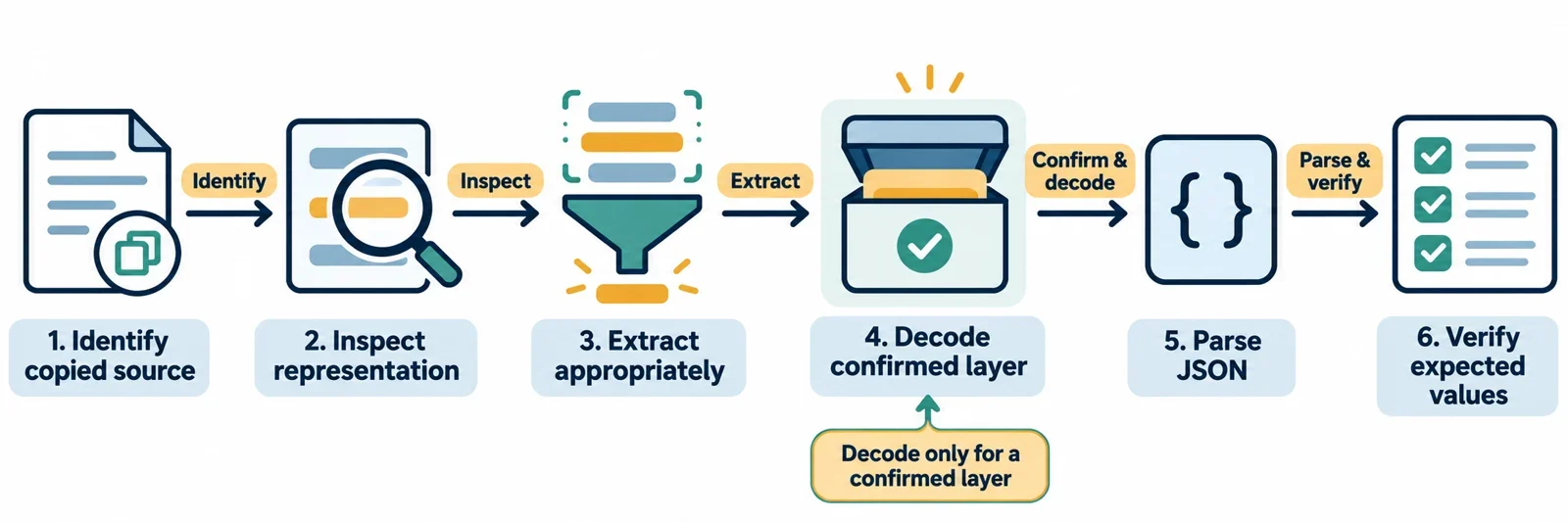
If copied text reads {"name":"Ada"}, it lacks the double-quoted property name and string value required by JSON. Confirm whether the intended text is {"name":"Ada"} before editing it. Once that relationship is established, recover the confirmed text, parse it, and check the resulting values.
An HTML origin alone does not establish which extraction or transformation your sample needs. Record where the text came from and compare it with a known original. The same visible token can appear inside an already valid JSON string: {"label":"""}. This guide focuses on the syntax and value checks you can make, with a controlled recovery example and separate questions for choosing an HTML extraction method.
Identify what was actually copied
Preserve the original sample before editing it. Keep a separate working copy and record whether it came from rendered content, HTML source, an attribute, a script data block, a DOM property, or a raw response. The appearance of " alone does not establish the history of the string.
Start with an expected result. For the running example, the intended object has a property named name whose value is Ada. Obtain that expectation from the producer or a known original. Comparing the copy with an established input gives you a concrete basis for making a correction.
Useful questions include:
- Which copy action produced this exact string?
- Can the producer provide the original JSON separately?
- Does the copied sample contain ordinary double quotes, the token
", or both? - Does that token occupy a position where JSON requires a quotation mark, or occur inside an existing string value?
Compare {"name":"Ada"} with {"label":"""}. The first lacks a properly quoted property name. The second places the token inside a quoted value. Record which situation you have, together with the expected field values, before selecting a recovery operation.
Distinguish HTML character references from JSON escapes
JSON uses a backslash as its escape prefix. The token " does not supply the double quotes required around a JSON property name or string value. This establishes a JSON syntax issue when the token occupies those delimiter positions; explaining the HTML transformation requires information about the producing system.
For that part of the investigation, request a documented input/output pair and identify the copy path. Use those observations to establish whether an outer transformation needs reversing.
Delimiters and characters inside values
A quotation mark can delimit a property name or string value, as in {"name":"Ada"}. A quotation-mark character can also belong inside the value, where JSON requires it to be escaped.
Compare these JSON text examples:
{"quote":"\""}
{"quote":"\u0022"}
The first shows a quotation mark escaped within a string. The second illustrates the permitted form consisting of a backslash, lowercase u, and four hexadecimal digits. Both retain ordinary double quotes around the property name and the string value.
Before editing a quote-like sequence, identify its role: a required delimiter, an escape within a JSON string, or literal text that the value should preserve.
Extract JSON according to its HTML container
Locate the container before choosing an extraction operation. JSON can be embedded in a script element with an appropriate type attribute. The presence of such a container does not establish what a particular copy action supplies to your parser.
Use a controlled sample with a known original. Record the exact string returned by each candidate extraction method, then compare it with that original. Establish the method’s behavior through documentation or a controlled comparison before adding a decoding step.
| Place being inspected | Candidate to investigate | Check to perform |
|---|---|---|
| Ordinary text element | textContent |
Compare the returned characters with the original JSON. |
| Attribute | getAttribute() for the relevant attribute |
Record the exact value selected for parsing. |
| JSON script data block | The block’s text and type attribute | Confirm that the selected block contains the intended data. |
| Element markup | innerHTML for comparison |
Check whether the returned representation matches the intended JSON text. |
This table identifies investigation points; it does not establish character-reference handling for those APIs or containers. Specifically verify whether an extraction path has already reversed the transformation you are considering.
For the recovery example below, the copied text and intended original are supplied explicitly. Apply the same comparison to your extraction path before using that example as a model.
Decode one confirmed layer
For this controlled example, establish two conditions: the producer intended {"name":"Ada"}, and every occurrence of " in the copied sample was introduced in place of an intended quotation mark. Those conditions justify the following specific correction.
| Checkpoint | Text or expected value |
|---|---|
| Preserved copied text | {"name":"Ada"} |
| Confirmed original JSON | {"name":"Ada"} |
| Expected parsed field | name equals Ada |
In a separate working copy, change the four confirmed delimiter tokens to double quotes so the text matches the original. Keep both versions. The next section shows the parsing check for the recovered text.
This is a demonstrated correction for a known sample. Before automating it across other inputs, establish that every affected occurrence has the same intended meaning. Choose a general decoder only after verifying its behavior against the producer’s output.
Investigate an apparent additional layer
If the sample contains ", preserve those exact characters. Ask whether the producer transformed an already transformed string or deliberately stored that text as data. Request intermediate strings when several operations are involved.
Repeatedly decoding until parsing succeeds does not establish the intended content. A transformed version may satisfy JSON syntax while containing changed values. Record each justified operation and compare its output with the expected result.
Verify the recovered text with a JSON parser
Pass the recovered text to JSON.parse(). Use a JSON parser rather than eval, keeping the copied content as input data.
For the confirmed original, this executable expression checks the field directly:
JSON.parse('{"name":"Ada"}').name;
// Expected value: "Ada"
The unrecovered sample provides a separate syntax check:
JSON.parse('{"name":"Ada"}');
Expected outcome: parsing fails because the property name lacks the required double-quote delimiters. The example does not depend on a particular exception type or error message.
Check syntax and meaning separately
A successful parse answers whether the recovered text can be interpreted as JSON. Checking that name equals Ada answers whether that field matches the established expectation. Keep both checks in your acceptance criteria.
When parsing fails, inspect the exact input supplied to the parser. Compare it with the confirmed original and review the last transformation. If the parser supplies useful feedback, use it to focus that comparison.
A failure does not establish that another decoding pass is appropriate. Return to the extraction and transformation record to identify the specific mismatch. When parsing succeeds but a field differs, investigate the correction with the same care.
Preserve reference text that belongs to the data
The characters " can be the intended contents of a JSON string. In this example, both the property name and its value already have the required double quotes:
JSON.parse('{"label":"""}').label;
// Expected value: """
Here, the expected value is the literal text ". No delimiter is missing. Changing those characters inside the value would alter the data that this example is intended to preserve.
This makes the label example useful alongside the name example when reviewing a copy action. The name example checks whether required JSON quotation marks survive. The label example checks whether meaningful text inside a value survives. Together, they expose two different requirements that a single successful parse cannot establish.
Which fields should you inspect?
Choose fields with known expected values. For the running example, check that name equals Ada. For this example, check that label equals ". If the dataset contains explanatory labels or encoding examples, ask which strings must remain literal.
When a transformation changes one of those values unexpectedly, return to the preserved input. Review the extraction and recovery steps before accepting the result. Keep the expected strings with your example so future changes can be assessed against the same requirements.
Match each transformation to its encoding layer
Keep extraction, any outer transformation, and JSON parsing as explicit steps. For each step, record its input, purpose, and expected output. That record gives you a specific place to investigate when the final value differs.
The following table identifies what to establish before choosing an operation. A sequence’s appearance alone does not determine the appropriate decoder.
| Observed notation | What to establish | Next step |
|---|---|---|
" |
Does the producer confirm a substitution, or should the token remain literal? | Reverse the demonstrated substitution or preserve the value. |
%22 |
Is there a demonstrated URL encoding layer with a known original? | Select a matching URL decoding operation for that confirmed layer. |
\" or \u0022 inside a JSON string |
Is the sequence part of otherwise valid JSON string syntax? | Let the JSON parser interpret the JSON text. |
Introduce URL decoding only when the input’s history establishes a URL encoding step. An HTML origin alone does not provide that evidence.
Write the intended sequence plainly: extract the correct content, reverse any demonstrated outer encoding, parse the recovered JSON text, and inspect its values. If several layers are involved, use the producer’s process or intermediate outputs to establish their order before assembling a recovery sequence.
Prevent the mismatch in future copies
If you control the page, design its copy action to supply the intended JSON text. Compare the exact copied string with a known original, then parse it and verify important values. This makes the copy action’s expected result concrete and reviewable.
Use both examples in this guide when checking that action. The name example checks preservation of required quotation marks. The label example checks preservation of literal " text. Add examples from the actual data when they expose another meaningful requirement.
Where available, provide a standalone JSON source as an alternative. The MIME type for a standalone JSON file is application/json. Clearly identify the alternative so readers can obtain the intended data directly.
After recovery, use a JSON parser for syntax feedback and a formatter to make the text easier to read. Establish any HTML character-reference decoding behavior separately before relying on a tool to perform that step. Formatting still needs to be followed by checks against expected field values.
Retain the expected copied strings and field values alongside the copy implementation. When it changes, compare the new output with those expectations. Readers handling an unfamiliar sample can use the same practical record: the untouched input, the confirmed intended text, the justified correction, and the parsed values.